
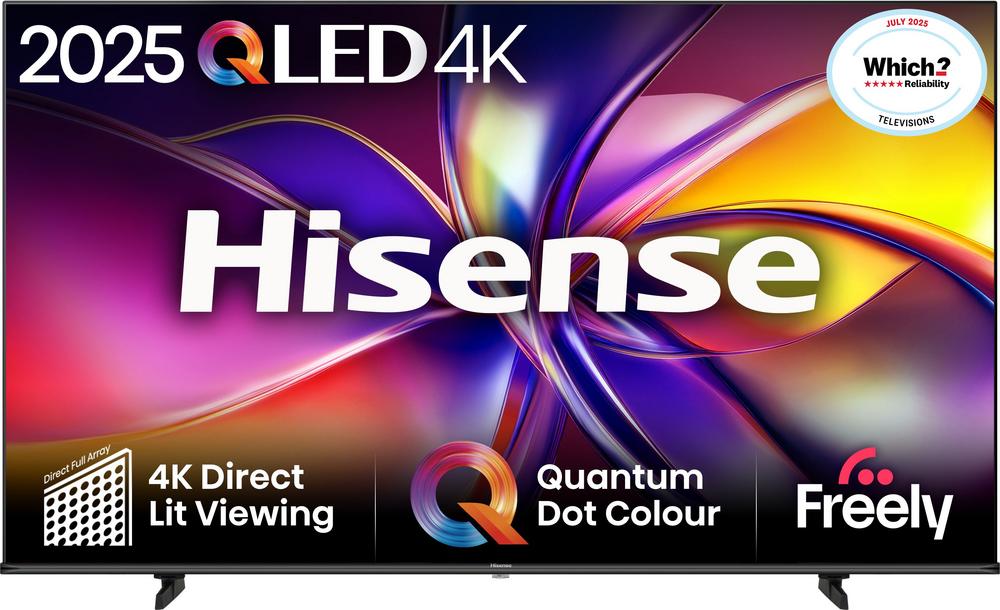
If you are planning a big-screen upgrade this year, a 65-inch 4K QLED is a very sweet spot. It is large enough for a cinematic feel, sharp enough to show off Ultra HD films and games, yet still fits into most UK living rooms. Using the Hisense E77NQTUK PRO 65″ 4K Ultra HD QLED Smart Freely TV as a real-world example, this guide walks through what to look for in a modern QLED TV, how to choose the right size, and when it might be worth considering closely related alternatives from the same line-up.
Understanding modern QLED TVs
QLED TVs combine an LED backlight with a quantum dot layer to boost brightness and colour. In practice, that means a punchier, more vivid picture than many standard LED sets, especially with HDR films and sport. When you step up to a 65-inch screen like the Hisense E77NQTUK PRO, every improvement in colour, contrast and motion is far easier to see from your sofa.
While the technology behind each brand’s QLED implementation varies, the core aim is the same: richer colours, cleaner whites and better control of brightness across the panel. That makes QLED an especially good fit if you watch a mix of streaming services, live sport and gaming on one main TV.
If you want to see how this plays out on a specific model, you can read our full review of the Hisense E77NQTUK PRO 65-inch QLED TV for hands-on impressions and detailed testing.
Is a 65-inch TV the right size for your room?
A 65-inch screen is a serious upgrade if you are coming from a 40–50-inch TV, so it is worth checking the basics before you start comparing models.
- Viewing distance: For a 65-inch 4K set, sitting roughly 2.5–3.5 metres away works well for most people.
- Wall space: Always measure the total width and height of the TV, including its stand if you are not wall-mounting.
- Furniture depth: Make sure your TV stand or unit is deep and sturdy enough, and consider cable clearance at the back.
If you like the idea of a 65-inch but are not entirely sure, you might find a smaller or larger QLED from the same family a better match. For instance, the Hisense E78Q 55″ 4K Ultra HD QLED Smart Freely TV offers a more compact option that suits flats or snug lounges, while the Hisense E7Q 75″ 4K Ultra HD QLED Smart Freely TV pushes the cinematic feel even further in larger rooms.
Picture quality: what really matters day to day
With so many badges and buzzwords around picture quality, it is easy to feel overwhelmed. Instead of chasing every acronym, focus on how you actually watch TV.
Brightness and reflections
In bright UK living rooms with large windows, brightness and reflection handling are critical. QLED panels, including the Hisense E77NQTUK PRO, are designed to hit higher brightness levels than many basic TVs, helping the picture remain clear during daytime viewing. If your TV sits opposite a window or in a very light room, this alone can make a big difference.
Colour and contrast
Quantum dot technology helps maintain rich colours at higher brightness without washing them out. That is particularly helpful for nature documentaries, animated films and HDR dramas, where subtle gradients in sky, skin tones and shadows are easier to appreciate. A well-tuned QLED like the E77NQTUK PRO should deliver a satisfying balance of vibrancy and realism, rather than oversaturated novelty colours.
Motion handling for sport and gaming
If you watch a lot of football, Formula 1 or fast-paced action films, you will want a TV that keeps motion smooth without introducing strange artefacts. Modern QLED sets typically offer motion processing options that can be tweaked to taste. As you compare models such as the E77NQTUK PRO and the closely related Hisense E78Q 65″ 4K Ultra HD QLED Smart Freely TV, pay attention to how reviewers describe motion control and any recommended settings.
Smart TV platforms and everyday usability
Once the novelty of a new screen wears off, you will spend far more time navigating apps than staring at spec sheets. That is where the smart TV platform really matters.
- Core apps: Check for the services you actually use – BBC iPlayer, ITVX, Netflix, Prime Video, Disney+, YouTube and so on.
- Interface speed: A responsive interface makes flipping between apps and inputs much less frustrating.
- Voice control: Voice search can be handy for quickly finding films or switching inputs, especially on a large TV that becomes the family hub.
The Hisense E77NQTUK PRO is a fully fledged smart TV, designed to handle streaming, live TV and casting from your phone in one place. If you want a deeper dive into its app support, remote design and menus, you can read our full review of the Hisense E77NQTUK PRO 65″ QLED Smart Freely TV for day-to-day usability insights.
Screen size neighbours: 55″, 65″ and 75″ compared
One of the simplest ways to narrow down your choice is to decide whether you should shift up or down a size. Fortunately, there are several closely related QLED options built around similar ideas but different diagonals.
When a 55-inch QLED makes more sense
If your seating distance is closer to 2 metres, or you are placing the TV in a bedroom or compact open-plan space, a 55-inch model can feel more balanced. The Hisense E78Q 55″ 4K Ultra HD QLED Smart Freely TV is a good example: it brings you into the same family of bright, colourful QLED panels in a more modest footprint, and is often priced competitively for the specification.
Sticking with 65-inch, but choosing a different flavour
If you are set on 65 inches but open-minded about the exact model, it is worth comparing different ranges. The Hisense E78Q 65″ 4K Ultra HD QLED Smart Freely TV sits very close to the E77NQTUK PRO on paper, but may differ in styling, processing or price. Meanwhile, the Hisense A7Q 65″ 4K Ultra HD QLED Smart Freely TV offers another route into 65-inch QLED, potentially appealing if you prioritise a particular balance of features versus cost.
Going big with a 75-inch centrepiece
For larger lounges and open-plan spaces, a 75-inch TV can look more naturally proportioned against long walls and wide media units. The Hisense E7Q 75″ 4K Ultra HD QLED Smart Freely TV brings that cinema-like scale while keeping the same 4K QLED foundations. Just remember to allow extra space for the stand footprint or fixings on your wall mount, and make sure your seating distance still feels comfortable.
Connectivity, gaming and future-proofing
A big-screen QLED is often the heart of a broader entertainment set-up, so it pays to think about what you will plug in over the next few years.
HDMI ports and legacy connections
Before you buy, list all of your devices: streaming boxes, games consoles, soundbars, Blu-ray players and set-top boxes. Most households quickly use up three or four HDMI ports, so having a generous number of inputs makes cable-juggling less likely. Also check whether there is a dedicated eARC port for passing high-quality sound to a soundbar or AV receiver without extra remotes and complexity.
Gaming on a QLED TV
If you own a modern console or gaming PC, a QLED TV like the Hisense E77NQTUK PRO can make titles look superb thanks to strong brightness and colour. When comparing models such as the E77NQTUK PRO and the E78Q range, look for features that reduce input lag and handle fast motion smoothly. Dedicated game modes typically tweak picture processing to prioritise responsiveness over heavy-handed smoothing, which is exactly what you want for competitive play.
Sound: built-in speakers vs soundbar
Ultra-slim TV designs often leave limited room for speakers, and that is true across almost all modern big-screen sets. While a 65-inch QLED like the Hisense E77NQTUK PRO will include integrated speakers that are perfectly usable, especially for news and light entertainment, a separate soundbar can instantly lift your experience with films, sport and music.
- Dialogue clarity: A soundbar often makes speech much clearer without needing to turn the volume up.
- Bass impact: External speakers, particularly those with a subwoofer, give action scenes and soundtracks more weight.
- Simpler cabling: With HDMI eARC, you can usually control volume and power with your TV remote.
When planning your budget, it can be smart to factor in a simple soundbar if you are stepping up to a large 4K QLED. It helps the overall package feel more in line with the visual upgrade you are paying for.
Energy use and eco settings on large QLED TVs
A 65-inch 4K QLED inevitably uses more power than a smaller screen, but that does not mean it has to be wasteful. Modern sets offer a range of energy-saving tools that can be tailored to your room and habits.
- Eco picture modes: These reduce peak brightness, which can still look fine in dim rooms while cutting energy use.
- Automatic brightness: Some TVs can adjust to ambient light, avoiding over-bright images in darker conditions.
- Sleep timers and auto-off: Handy if you tend to fall asleep with the TV on or leave it running in the background.
When comparing options like the E77NQTUK PRO, E78Q and A7Q series, it is worth checking how easy it is to access and customise these settings. A well-designed menu makes it far more likely you will actually use them.
Choosing between similar Hisense QLED models
Looking across the Hisense line-up, you will notice several QLED ranges in similar sizes and price brackets. That is not an accident: it is designed to give you a choice of balance between design, processing power and headline features.
A sensible approach is:
- Start with the screen size and budget you are comfortable with.
- Shortlist two or three models – for example, the Hisense E77NQTUK PRO, the Hisense E78Q 65″ 4K QLED and the Hisense A7Q 65″ 4K QLED.
- Read in-depth reviews of each, focusing on the aspects that matter most to you: gaming, films, live TV, or general family use.
The Hisense E77NQTUK PRO 65″ stands out as a very well-rounded 4K QLED Smart Freely TV with a large body of user feedback behind it. To see how it behaves in the real world, including picture tuning tips and ideal settings, make sure you read our full review of the Hisense E77NQTUK PRO 65″ 4K Ultra HD QLED.
Practical setup tips for a smooth first week
Once your new QLED TV arrives, a bit of care during setup will help you get the best from it straight away.
- Take your time with the stand or wall mount: Large screens are awkward to handle; always have a second person to help.
- Run through the full initial setup: Sign into streaming apps, run any firmware updates and scan for live channels on day one.
- Choose a sensible picture preset: Standard or Cinema modes are often a better starting point than overly vivid modes.
- Enable or disable motion smoothing to taste: Some people like the ultra-smooth look for sport but not for films.
Most modern QLEDs, including the Hisense E77NQTUK PRO and its E78Q and A7Q siblings, guide you through this process step by step. Spending an extra 20–30 minutes up front will save you lots of fiddling later.
Final thoughts
Stepping up to a 65-inch 4K QLED TV is one of the most noticeable home upgrades you can make, whether you are into films, binge-worthy series, football or gaming. By focusing on size, picture quality, smart features and connectivity – rather than just buzzwords – you can narrow down from a crowded market to a handful of models that genuinely suit your home.
The Hisense E77NQTUK PRO 65″ QLED Smart Freely TV is a strong example of this new generation of big-screen televisions, with closely related alternatives like the E78Q 55″ and 65″, the A7Q 65″ and the E7Q 75″ giving you flexibility on size and specification. Use the links throughout this guide to dive into the detailed hands-on reviews, compare real-world performance, and choose the TV that will earn pride of place in your living room for years to come.