
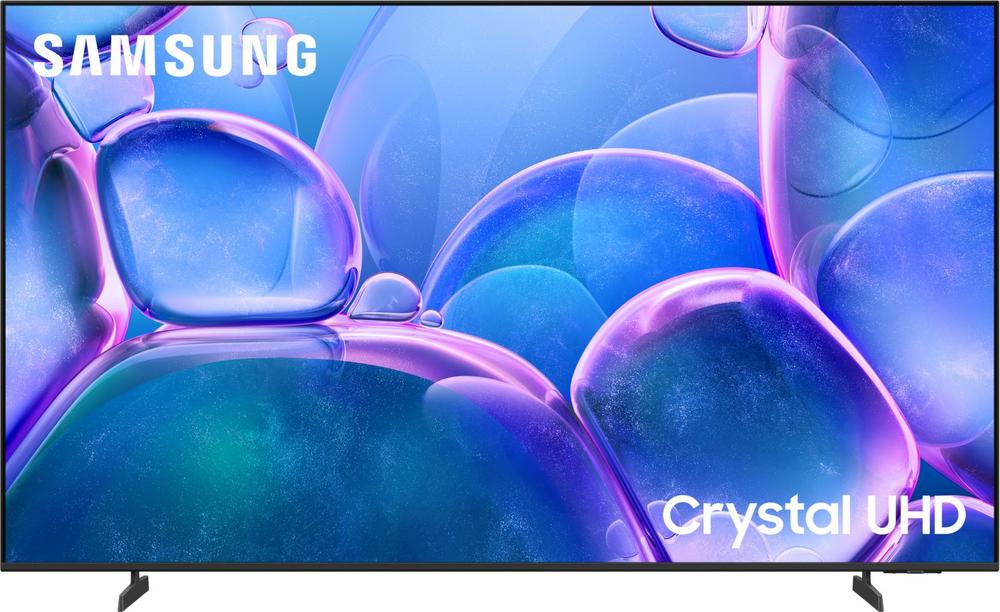
If you’ve ever watched a big match or a blockbuster film on someone else’s huge TV and gone home slightly jealous, you’re not alone. Large 4K screens have dropped in price and risen in quality, so sets like the Samsung U8000F 85″ 4K Ultra HD Smart TV (UE85U8000F) are suddenly realistic options for many living rooms. But before you commit to a screen this big, it’s worth taking a step back and working out what actually suits your room, your budget and how you watch TV day‑to‑day.
Why Consider an 85-Inch 4K TV at All?
An 85‑inch TV is about bringing the cinema home. For films, sport and big gaming sessions, the extra size gives you a more immersive experience where the picture fills your field of view. A well‑set‑up 85‑inch 4K TV can make even familiar programmes feel new again.
The Samsung U8000F 85" 4K Ultra HD Smart TV sits right in this sweet spot. It matches a huge screen with 4K resolution, smart TV features and the kind of modern design that can still work in a normal home rather than a mansion. With a strong user rating of 4.8 from hundreds of reviews, it’s clear plenty of households have successfully made the jump to this size.
But that doesn’t automatically mean it’s the right choice for you. Let’s unpack what you should think about before choosing the U8000F 85″ or one of its close rivals.
Getting the Size Right: Will 85 Inches Overwhelm the Room?
The most important question with any big TV is simple: will it dominate the room in a bad way? For 4K resolution, you can sit closer than you might expect because the picture is much sharper than old Full HD sets. Many people find an 85‑inch TV feels comfortable at around 3–4 metres away.
If your sofa is much closer than that, stepping down a size can make more sense. The Samsung U8000F range includes a 75‑inch version, the Samsung U8000F 75" 4K Ultra HD Smart TV, which keeps the same family feel in a slightly more manageable package. This can be a smart compromise if you love the idea of a big Samsung screen but want just a little less bulk in the room.
Before you buy, do a quick mock‑up. Measure the total width and height of the TV and mark it out on your wall with masking tape, or stand a large piece of cardboard where the screen will sit. You’ll quickly see whether the 85‑inch Samsung U8000F will feel impressive or overwhelming once it’s actually installed.
Desk, Stand or Wall? Planning the Ideal Setup
Where your TV goes is just as important as which one you choose. Large screens demand proper planning.
Wall Mounting for a Clean Look
Many people prefer to wall‑mount an 85‑inch TV to save space and create a cleaner look. This can work brilliantly with the UE85U8000F, but there are a few things to double‑check:
- Make sure the wall you’re using is solid enough and that you choose a bracket rated for the TV’s weight and size.
- Plan where cables and power sockets will go to avoid dangling leads under a pristine new screen.
- Think about viewing angle: ideally your eyes should be roughly one‑third up from the bottom of the screen when seated.
Using the Supplied Stand
If wall‑mounting isn’t an option, you’ll need a low, wide and stable TV unit. At 85 inches, the Samsung U8000F needs serious real estate, so check both width and depth. The larger footprint can actually be easier to live with if you have a deep media unit and prefer the flexibility to move or re‑angle the TV later.
Choosing Between Brands at This Size
Once you know roughly what size works, the next choice is brand and model. Samsung, Sony, LG and Hisense all have strong contenders in the big‑screen 4K category, each with slightly different strengths.
Samsung U8000F 85″ vs Same-Range and Similar-Sized Alternatives
The Samsung U8000F 85″ is part of a wider U8000F line. If you like the overall look, interface and reputation of this range but are flexible on size or budget, it’s worth comparing:
- Samsung U8000F 85" 4K Ultra HD Smart TV (UE85U8000F) – the biggest, most cinematic option, great if you have the space and sit a little further back.
- Samsung U8000F 75" 4K Ultra HD Smart TV (UE75U8000F) – similar family feel at 75 inches, still large but a little easier to place in typical UK living rooms.
Because these models share a lot of DNA, your choice comes down mainly to room size and viewing distance. If you’re weighing up the two, it’s well worth taking a closer look at the feature breakdowns in our in‑depth guides. You can read the detailed review of the Samsung U8000F 85" to see how it performs in different content and lighting conditions.
Looking at Other Big-Screen Brands
It’s sensible to compare a couple of rival brands as well, especially if price or platform is important to you.
- Hisense A6Q 85″ 4K Ultra HD Smart Freely TV (85A6QTUK) – With a competitive price and a huge number of user reviews, this is one of the most popular big‑screen options around. If value is your main priority, the Hisense A6Q 85" 4K Ultra HD Smart Freely TV is well worth a look alongside the Samsung U8000F 85″.
- LG UR78 86″ 4K Ultra HD Smart TV (86UR78006LB) – At 86 inches, this LG slightly edges the Samsung on size, and LG’s smart platform has a different feel some people prefer. You can get a better sense of what it offers in our LG UR78 86" 4K Ultra HD Smart TV guide.
- Sony BRAVIA 3 S35B 55″ 4K Ultra HD Smart Android TV (K55S35B) – This one isn’t a size match, but if you’re unsure about going as big as 85 inches, moving down to a 55‑inch 4K TV can feel like a safer first step. Sony’s BRAVIA 3 S35B range combines 4K resolution with the Google TV / Android TV ecosystem, which some people love for its app support and voice control. See how it stacks up in our Sony BRAVIA 3 S35B 55" 4K Ultra HD Smart Android TV overview.
By looking at one or two options from each brand, you can decide whether picture style, smart interface and remote design matter more to you than raw inches of screen size.
Smart TV Experience: Living with a Modern 4K Set
Most large 4K TVs now double as home entertainment hubs, and the Samsung U8000F 85″ is no exception. Beyond Netflix and iPlayer, modern smart platforms usually include a wide range of streaming apps, catch‑up services and even basic games.
When comparing the U8000F 85″ with alternatives like the Hisense A6Q 85″ or LG UR78 86″, think about:
- Interface layout – Do you prefer a tile‑based home screen, or a simple row of apps along the bottom? Watch a couple of videos or screenshots of each system.
- Voice control – Some families use this constantly for search and playback; others never touch it.
- Update support – A well‑supported smart platform should keep getting app updates and security patches for a decent number of years.
If you’re the kind of person who mostly plugs in a set‑top box or games console and ignores the built‑in apps, these differences may not matter much. In that case, you can happily prioritise picture size and overall value instead.
Picture Quality on Big Screens: What Really Matters
Specs sheets are full of buzzwords, but when you’re watching on an 85‑inch screen, a few basics have the biggest impact:
- 4K resolution – Essential at this size; thankfully all the models discussed here offer 4K Ultra HD.
- Decent brightness and contrast – So the image doesn’t wash out in daylight, and films still look punchy in darker scenes.
- Good motion handling – Especially important if you watch a lot of sport or action films, where judder and blur stand out.
- Upscaling – Most content is still HD rather than native 4K. How well a TV cleans up and sharpens lower‑resolution sources can dramatically affect your day‑to‑day viewing.
The Samsung U8000F 85″ aims to balance all of these for typical living‑room use. To see how it actually copes with everyday content – from SD channels up through 4K streaming – it’s worth diving into real‑world testing. Our in‑depth hands‑on look at the set goes through this in detail; you can read our full review of the Samsung U8000F 85" 4K Ultra HD Smart TV here.
Sound: Matching Audio to a Giant Picture
No matter which big‑screen 4K TV you choose, sound is rarely as impressive as the picture straight out of the box. Slim cabinets leave limited room for deep, rich speakers, and an 85‑inch image cries out for matching audio.
If you’re investing in a TV like the UE85U8000F or the similarly sized Hisense A6Q 85″, it’s worth budgeting for at least a decent soundbar. Even a mid‑range bar with a wireless subwoofer can make films and music feel far more powerful, and dialogue clearer in busy scenes.
For a truly cinematic feel, consider adding rear speakers or going for a system that supports immersive formats. Just remember to keep cables tidy and think about where speakers will sit so the room doesn’t feel cluttered.
Energy Use and Running Costs for Large TVs
Bigger TVs do use more power, so it’s wise to think about running costs. Newer sets are more efficient than older models, and many include eco settings to automatically dim the screen in darker rooms or when content doesn’t demand full brightness.
To keep bills in check with an 85‑inch TV:
- Use an energy‑saving picture mode for everyday TV and reserve brighter presets for daytime sport or films.
- Turn off the screen when listening to music via streaming apps.
- Make use of automatic standby timers so the TV doesn’t sit on all night if someone falls asleep on the sofa.
These simple tweaks apply equally whether you go for the Samsung U8000F 85″, the LG UR78 86″ or a smaller option like the Sony BRAVIA 3 S35B 55″.
Gaming on a Big 4K TV
If you own a modern games console or gaming PC, a large 4K TV can be a fantastic upgrade. The sheer size makes open‑world games and split‑screen multiplayer feel much more impressive than on smaller sets.
When comparing big TVs for gaming, look out for:
- Low input lag – So your actions feel responsive.
- Game modes – Dedicated presets that automatically optimise picture settings and processing.
- Support for modern gaming features – Depending on what your console supports.
Even if you’re not chasing every latest spec, moving from a smaller older TV to something like the Samsung U8000F 85″ or Hisense A6Q 85″ will transform how your games look and feel.
Which Big 4K TV Is Right for You?
There’s no single answer that suits everyone, but you can narrow the field quickly by asking yourself a few key questions:
- How far do I sit from the screen? – If it’s around 3–4 metres, an 85‑inch TV like the UE85U8000F or Hisense A6Q 85″ could be ideal. Closer than that? A 75‑inch option such as the UE75U8000F might be better balanced.
- What’s my budget? – If you want the biggest possible screen per pound, the competitively priced Hisense and LG options are strong contenders. If you’re happy to pay more for a specific brand’s interface and overall feel, the Samsung and Sony models deserve close attention.
- How important is the smart platform? – If you live inside the TV’s apps, navigation and layout will matter a lot. If you mainly use external boxes or consoles, you can focus more on size, picture and sound.
Once you’ve answered those, you’ll have a shortlist. From there, dive into detailed product write‑ups to see how each model handles real‑world viewing and everyday niggles before you buy.
Next Steps
Moving up to an 85‑inch 4K TV is a big step, but done right it can completely transform how you watch films, follow sport and enjoy games at home. The Samsung U8000F 85″ 4K Ultra HD Smart TV offers a compelling mix of size, features and strong owner feedback, and it sits alongside a healthy set of alternatives from Samsung itself, Hisense, LG and Sony.
Take a little time to measure your room, think about wall‑mounting versus a stand, and decide whether you want sheer size, maximum value or a particular smart platform. Then compare a few leading models in detail – starting with the Samsung U8000F 85" 4K Ultra HD Smart TV review and the linked alternatives – and you’ll be in a great position to pick a big‑screen TV you’ll enjoy for years.