Home » Product Reviews » Computing » Monitors & Projectors » Monitors » ASUS ROG Strix XG49VQ 49″ UltraWide Full HD 144Hz Curved Gaming Monitor with FreeSync Premium Pro with NVidia G-Sync review
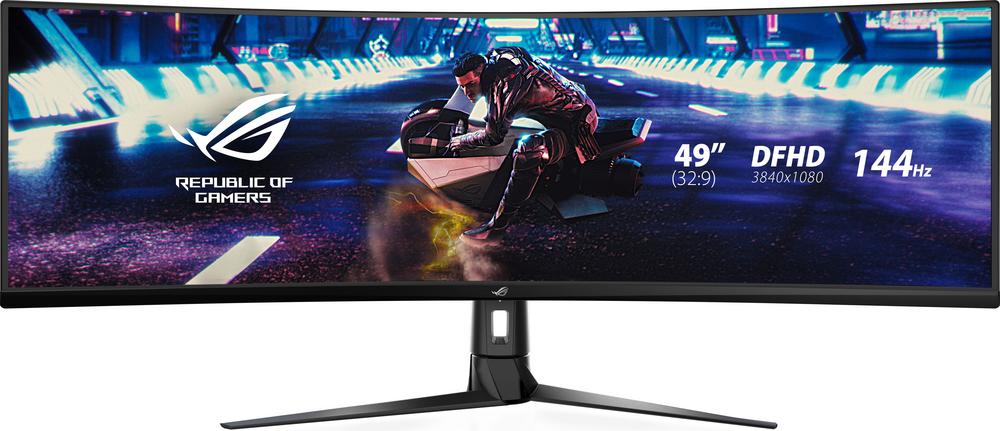
The ASUS ROG Strix XG49VQ is a 49-inch ultra-wide curved gaming monitor designed to replace a dual-screen setup with one sweeping 32:9 display. With a 144Hz refresh rate, 4ms response time and both AMD FreeSync Premium Pro and Nvidia G-Sync compatibility, it’s clearly aimed at committed PC and console gamers.
This is a premium option in the gaming monitor space, with the kind of spec sheet and ROG branding that will appeal to enthusiasts. The combination of HDR400, strong 3000:1 contrast from the VA panel and a huge 3840 x 1080 resolution makes it as much about immersion as outright speed.
Owner feedback is very strong, with a 4.9 out of 5 rating from a decent number of reviews, suggesting that buyers are overwhelmingly happy with the experience once it’s on the desk.
The ASUS ROG Strix XG49VQ is ideal for gamers who want a single, seamless ultra-wide display instead of juggling two separate monitors. If you play racing sims, flight games or open-world titles, the 32:9 aspect ratio and 1800R curve will give you an expansive field of view that standard 16:9 screens simply can’t match.
It suits enthusiasts with a reasonably powerful PC who can push high frame rates at 3840 x 1080. With a 144Hz refresh rate and variable refresh technologies, it’s built for smooth, competitive play as well as cinematic single-player experiences.
The sheer width and 49-inch size make it better suited to a dedicated gaming desk or home office than a tiny bedroom. It’s a premium purchase rather than a budget buy, so it will most appeal to gamers and content creators willing to invest in their main display.
If you mostly browse the web or play casual games, this will be overkill. But if you spend hours a week in your favourite titles, stream, or work with timelines in video or audio editing, the extra horizontal space and multitasking potential are a real advantage.
The huge 49-inch 32:9 ultra-wide screen offers a genuinely immersive experience, especially in games that support wider fields of view. It feels like having two 27-inch 1080p monitors side by side, but without bezels breaking up the picture.
A 144Hz refresh rate and 4ms response time keep motion smooth and responsive, making it well suited to fast-paced shooters, racers and competitive titles. Combined with FreeSync Premium Pro and Nvidia G-Sync support, you get tear-free, stutter-free gameplay when paired with a compatible graphics card.
The VA panel’s 3000:1 contrast ratio and DisplayHDR 400 certification give you deeper blacks and more impactful highlights than a basic SDR screen. Shadow Boost and ASUS GamePlus tools add gaming-focused tweaks to help you see enemies more clearly and fine-tune your HUD.
Practical touches are strong too: height adjustment, tilt and swivel make it easier to position such a large display correctly, while the built-in speakers and USB hub help reduce desk clutter. Picture-by-Picture support is handy if you want to run two systems side by side on the same screen.
The 3840 x 1080 resolution spread across 49 inches means pixel density is closer to a large 1080p monitor than to a 1440p or 4K panel. For pure productivity or text-heavy work, some users may notice less crispness compared with higher-resolution ultra-wides.
Its energy rating of G and relatively high HDR power consumption mean it’s not the most efficient monitor to run, especially if you game for long sessions each day.
The built-in speakers are a welcome extra, but at 10W total they’re more of a convenience than a full replacement for a decent gaming headset or sound system.
Finally, the sheer size demands plenty of desk space and a sturdy stand or VESA mount. If you’re used to a smaller display, you’ll need to rethink your setup to get the best ergonomics.
Living with the ASUS ROG Strix XG49VQ is all about that sweeping curve in front of you. Once it’s set up, the 1800R curvature wraps your peripheral vision so menus, maps and HUD elements sit naturally in view without constant head-turning.
Getting it physically positioned is easier than you might expect thanks to generous height adjustment, tilt from -5 to 20 degrees and swivel. This flexibility really matters with such a wide panel, helping you keep the centre at eye level and avoid neck strain.
Connectivity is straightforward: two HDMI 2.0 ports and a DisplayPort 1.2 connection give enough options for a gaming PC and one or two consoles, and the USB hub is handy for plugging in peripherals. The 3.5mm headphone jack keeps cable routing clean if you prefer wired audio.
Flicker Free and blue light reduction technologies help keep eye fatigue down during longer sessions. Owners planning marathon raids or long editing days will appreciate that, especially combined with the relatively bright 450-nit panel which stays clear in a well-lit room.
Performance-wise, the XG49VQ is clearly tuned for gaming. The 144Hz panel and 4ms response time deliver fluid motion with minimal blur when you’re panning quickly or tracking fast targets. Variable refresh support via FreeSync Premium Pro and Nvidia G-Sync compatibility keeps frame pacing smooth even when game performance fluctuates.
The VA panel’s 3000:1 contrast makes dark scenes in horror games or deep space shooters look punchier than on typical IPS office monitors. DisplayHDR 400 and HDR streaming support add extra pop to highlights, though it remains an entry-level HDR experience rather than full-fat HDR with local dimming.
For competitive play, ASUS GamePlus tools are a useful extra, offering overlays such as crosshairs, timers and FPS counters. Shadow Boost helps lift dark areas without washing out the whole image, making it easier to spot enemies hiding in gloomy corners.
The 32:9, 3840 x 1080 resolution is a double-edged sword: it’s superb for horizontal workspace, timelines and multitasking, and it’s easier to drive at high frame rates than a 4K panel. However, it doesn’t deliver the razor-sharp text and fine detail of higher-resolution ultra-wides, so it’s worth considering what you prioritise.
Quality-of-life features round things off nicely: Picture-by-Picture mode lets you view two sources at once, useful for streaming setups or combining work and play. The 1.073 billion colour support and wide 178°/178° viewing angles help maintain consistent colours across that vast width.
This ASUS ROG Strix model sits firmly in the premium bracket of gaming monitors, and the price reflects that. You are paying for a huge 49-inch ultra-wide panel, high refresh rate, dual adaptive sync support and a strong gaming feature set.
Given the 4.9 out of 5 user rating from 24 reviews, most buyers clearly feel they’re getting what they paid for. The ability to replace a dual-monitor setup, enjoy true wraparound immersion and still benefit from HDR and strong contrast helps justify the outlay if you’ll make full use of it.
If you just need a simple 1080p screen, there are far cheaper options. But for gamers and creators who specifically want a 32:9, 144Hz curved display with both FreeSync Premium Pro and G-Sync support, the XG49VQ offers a well-rounded package that makes the premium easier to swallow.
The ASUS ROG Strix XG49VQ is a seriously impressive ultra-wide gaming monitor that delivers on its promise of immersion. The combination of a 49-inch curved 32:9 panel, 144Hz refresh rate, adaptive sync and strong contrast makes games feel expansive and fluid, while extras like Picture-by-Picture, HDR support and a height-adjustable stand add everyday practicality.
It’s not perfect: resolution is effectively stretched 1080p rather than 1440p or 4K, power usage is on the higher side, and you’ll need a generous desk and competent graphics card to get the most out of it. For text-heavy productivity work, some users may prefer a higher pixel density display.
However, if your priority is immersive gaming and you’ve been considering replacing a dual-monitor setup with one seamless screen, this is a compelling option. Enthusiast gamers and content creators who value width, speed and smoothness over ultra-high resolution will find a lot to like here.
