Home » Product Reviews » Computing » Laptops » ASUS Vivobook 16 M1605YA-MB601W 16″ Laptop review
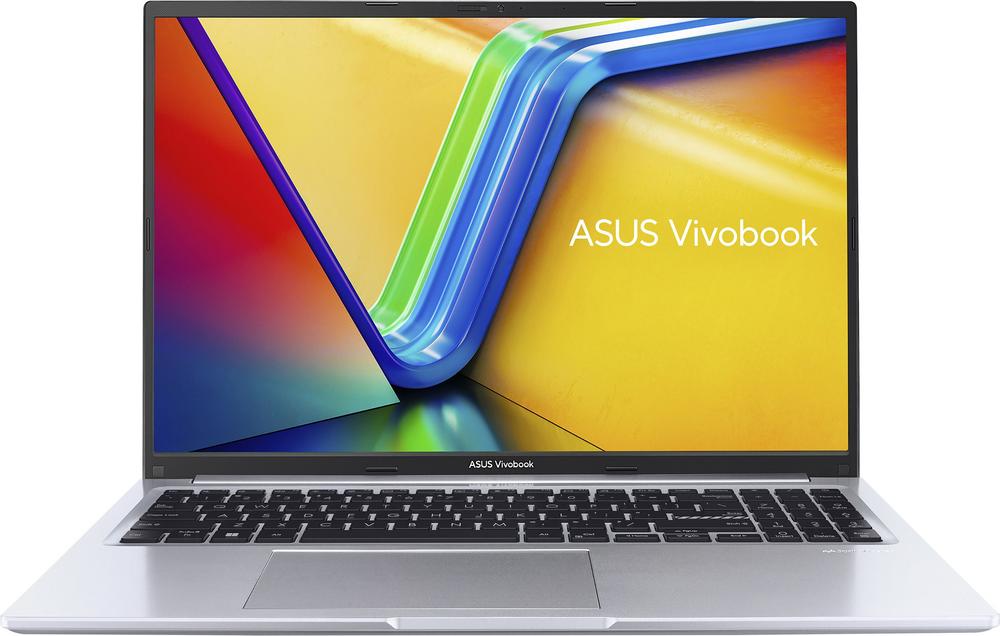
The ASUS Vivobook 16 M1605YA-MB601W is a 16-inch Windows 11 laptop aimed at everyday users who want more screen space without spending a fortune. With an AMD Ryzen 5 7000-series processor, 16GB of RAM and a fast 512GB SSD, it is clearly positioned as a capable mid-range workhorse rather than a budget basic.
At this price, it undercuts many premium ultrabooks while still offering a roomy 16:10 WUXGA IPS display, modern Wi-Fi 6E connectivity and a full-size keyboard with numeric keypad. It is built from plastic rather than metal, but the spec sheet is stronger than you often see at this level.
Owners seem very happy with their purchase: a user rating of 4.8 out of 5 from a couple of dozen reviews suggests performance and usability live up to expectations for home, study and office tasks.
The Vivobook 16 is a strong fit for students, home workers and families who need a reliable everyday machine for documents, browsing, streaming and light creative work. The 16-inch 16:10 screen gives you noticeably more room for spreadsheets, essays and web pages than the usual 14- or 15.6-inch options.
It suits buyers looking for mid-range performance on a sensible budget. The AMD Ryzen 5 7430U processor combined with 16GB of DDR4 RAM means it can handle dozens of browser tabs, office apps and even some light photo or video editing without feeling sluggish.
If you spend a lot of time typing, the full-size keyboard with numeric keypad will appeal, especially for data entry and finance work. The anti-glare IPS panel and 300-nit brightness also make it a practical choice for working in brighter rooms.
It’s less suitable if you’re a keen gamer or a creative professional working heavily with 3D or 4K video. There’s no dedicated graphics card, so it’s best viewed as a productivity and media machine rather than a performance laptop for demanding graphics workloads.
The combination of an AMD Ryzen 5 7430U processor and 16GB of RAM is a real strength at this price, giving smooth multitasking and snappy performance in everyday apps.
The 16-inch WUXGA (1920 x 1200) IPS display with a 16:10 aspect ratio provides extra vertical space compared with standard 1080p screens, making documents and web browsing more comfortable. The anti-glare finish and 300-nit brightness help reduce reflections under indoor lighting.
A 512GB NVMe SSD offers plenty of fast storage for Windows, apps and a decent media library, so you’re unlikely to need external drives straight away.
Modern connectivity is well covered: Wi-Fi 6E, Bluetooth 5.3, USB-C with power delivery, two USB-A ports and HDMI 1.4 make it easy to hook up monitors and peripherals.
Practical touches like the HD webcam with privacy shutter, built-in microphone, TPM security and a full numeric keypad improve day-to-day usability for work and study.
The plastic chassis helps keep costs down but won’t feel as premium or as rigid as aluminium-bodied laptops. If you travel daily and value a high-end finish, this may be a compromise.
There’s no dedicated graphics card, so modern games and heavy 3D work are off the table. Integrated AMD Radeon Graphics are fine for streaming and casual titles only.
The 42Wh battery and 45W charger are fairly modest for a 16-inch machine. While exact runtimes aren’t quoted, you should expect respectable but not class-leading battery life, particularly if you push the brightness up.
Only a one-year manufacturer warranty is included, which is standard but not generous. Some rivals offer longer cover or easy on-site support.
Finally, the HDMI port is version 1.4, which is fine for most external displays but more limited than newer HDMI standards if you plan to run high refresh rates at higher resolutions.
In day-to-day use, the Vivobook 16 feels like a sensible, straightforward laptop designed to get out of your way. Windows 11 Home boots quickly thanks to the NVMe SSD, and the Ryzen 5 processor copes well with switching between email, office work, streaming and web browsing.
The 16-inch IPS display is the highlight. The 16:10 aspect ratio means you see more lines of text or spreadsheet rows at once than on a 16:9 panel, which reduces scrolling and makes multitasking more comfortable. The anti-glare coating and decent 300-nit brightness help keep the image clear in brightly lit rooms.
Typing is comfortable on the full-size keyboard with numeric keypad, especially for longer reports or budgeting spreadsheets. The touchpad is a standard Windows precision-style pad, fine for gesture navigation and pointer control.
The HD webcam and built-in microphone are adequate for video calls, and the physical privacy shutter is reassuring when the camera isn’t in use. With Wi-Fi 6E and Bluetooth 5.3, connecting to fast home networks and wireless accessories is fuss-free.
Ports are sensibly arranged, with USB-A for older accessories, USB-C with power delivery, an HDMI port for external displays and a headset jack. The lack of Ethernet is typical for slim modern laptops, so plan on using Wi-Fi or a USB adaptor if you need wired networking.
Under the bonnet, the AMD Ryzen 5 7430U processor with six cores and a boost speed up to 4.3GHz delivers strong performance for everyday tasks and moderate creative work. Paired with 16GB of DDR4 RAM, it’s far more capable than entry-level 8GB machines when it comes to juggling multiple apps and heavy browser sessions.
Storage is handled by a 512GB NVMe SSD, which offers quick load times for Windows and applications as well as enough capacity for documents, photos and a decent amount of media. For most home and office users, this will be ample, with external drives available later if your library grows.
The WUXGA (1920 x 1200) IPS display is a step up from basic 1080p TN panels, with wider viewing angles and a taller 16:10 format that suits productivity. Colour coverage is quoted at 45% NTSC, which is fine for everyday use and casual photo editing but not accurate enough for colour-critical professional work.
Graphics duties are handled by integrated AMD Radeon Graphics. This is perfectly adequate for 4K video playback, streaming and light creative apps, but it is not intended for modern AAA gaming or demanding 3D workloads.
On the connectivity and usability front, you get Wi-Fi 6E, Bluetooth 5.3, USB-C with power delivery, two USB-A ports, HDMI 1.4 and a headset jack. Security is supported by a TPM chip and BIOS/user password protection. The 720p HD webcam, built-in microphone and a privacy shutter round out a sensible, well-balanced feature set for home and office life.
At £399, the ASUS Vivobook 16 M1605YA offers strong value in the mid-range laptop space. You’re getting a large 16-inch 16:10 IPS display, a current Ryzen 5 processor, 16GB of RAM and a 512GB NVMe SSD – a combination that often costs more in rival machines.
The compromises are mainly in the plastic build, basic integrated graphics and standard one-year warranty, none of which will bother typical home or student buyers looking for a capable everyday machine.
The high user rating of 4.8 out of 5 from 24 reviews backs up the sense that this model delivers on expectations for performance and usability at its price. For general computing, study and office work, it represents excellent bang for your buck.
If you need premium build quality, extended warranty or gaming-grade graphics, you will have to spend more. For most users, though, this hits a very attractive balance between cost and capability.
The ASUS Vivobook 16 M1605YA-MB601W is a very compelling option if you want a large-screen Windows laptop that feels quick and capable without straying into premium price territory. Its Ryzen 5 processor, 16GB of RAM and 512GB SSD give it the performance headroom many cheaper machines lack, and the 16-inch 16:10 IPS display is well suited to work and study.
It is not the right choice for serious gaming or professional creative work, and the plastic chassis and one-year warranty underline that this is a value-focused machine rather than a luxury one. Battery life is likely to be decent but not exceptional, given the modest 42Wh capacity.
For students, home workers and families who prioritise a roomy screen, smooth everyday performance and sensible pricing, this Vivobook is easy to recommend. If you can live without a metal body and dedicated graphics, it’s one of the smarter buys in its class.
