Home » Product Reviews » MSI Pro MP242L 23.8″ Full HD 100Hz Monitor review
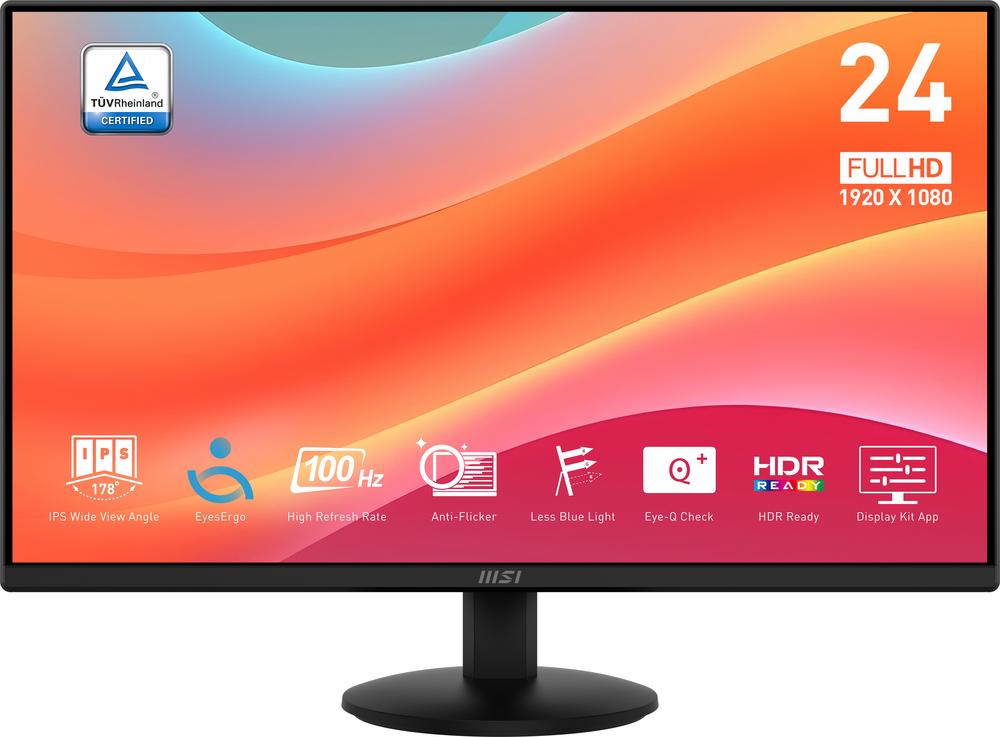
The MSI Pro MP242L is a 23.8-inch Full HD IPS monitor aimed squarely at home workers, students and anyone wanting a sharp, comfortable screen without spending a fortune. With a 100Hz refresh rate and 4ms response time, it’s a noticeable step up from the basic 60Hz office panels you typically see at this price.
MSI is well established in monitors, particularly for gaming, and some of that expertise trickles down here in the form of smoother motion and eye-care tech. User reviews are very positive, with an average score of 4.7 out of 5 from owners, suggesting that for most people it comfortably meets – and often exceeds – expectations.
It’s not a flashy, feature‑packed display, but on paper it looks like a very capable everyday workhorse that also handles light gaming and streaming without complaint.
This monitor is ideal if you want a reliable, good-looking screen for home office work, studying or casual browsing on a modest budget. The 23.8-inch size fits neatly on most desks, while the slim bezels and clean black design won’t look out of place in a bedroom or living room setup.
With its 100Hz refresh rate and 4ms response time, it also suits casual gamers who mostly play eSports titles or lighter games and want something smoother than a standard 60Hz office display, without paying for a dedicated gaming monitor. Adaptive-Sync support helps to reduce tearing when paired with a compatible graphics output.
If you’re often staring at the screen for hours at a time – whether that’s spreadsheets, coding, essays or streaming – the built‑in blue light reduction, flicker-free panel and MSI’s Eye-Q / EyesErgo features make this a smart choice for eye comfort.
It’s less suited to colour‑critical creative professionals, multi-monitor power users or anyone who needs a height-adjustable, VESA‑mountable screen. For everyday home and small office use, though, it ticks the key boxes.
The standout strength here is value: you’re getting a Full HD IPS panel with wide 178° viewing angles, so text looks crisp and colours stay consistent whether you’re sat dead centre or slightly off to the side.
The 100Hz refresh rate is a real upgrade over the usual 60Hz found on budget monitors. Scrolling through long documents and web pages feels noticeably smoother, and casual games benefit from more fluid motion, helped by the 4ms response time and Adaptive-Sync support.
Eye comfort is clearly a focus. Blue light reduction, flicker‑free technology and MSI’s Eye-Q / EyesErgo features are all designed to make prolonged use less tiring, which is especially valuable if you work or study at a screen all day.
Connectivity is straightforward but sensible for modern setups, with both HDMI and DisplayPort plus a legacy VGA input for older PCs. A headphone socket on the monitor itself is handy if your PC is tucked away under the desk.
User feedback is very strong, with a 4.7/5 rating backed by a decent number of reviews, which reinforces the impression that it performs very well for the price.
The stand only offers tilt adjustment and there’s no height adjustment or swivel, which limits how precisely you can set it up ergonomically. There’s also no VESA mount support, so you can’t easily put it on an arm or wall mount later.
While Full HD resolution is perfectly adequate at 23.8 inches, those used to higher‑resolution displays may find it less sharp for detailed design work or juggling lots of windows.
There’s no built‑in USB hub, so you don’t get the convenience of plugging peripherals directly into the monitor. Audio is limited to a headphone jack with no mention of integrated speakers, so you should plan on using separate speakers or a headset.
Lastly, the energy rating of D isn’t terrible but it’s not the most efficient panel on the market, which may matter if it’s on for many hours every day.
Day to day, the MSI Pro MP242L should feel straightforward and fuss‑free. The 23.8-inch footprint is compact enough for smaller desks, and the slim chassis keeps the overall look tidy. Setup is simple: connect power, plug in via HDMI, DisplayPort or VGA, tilt to a comfortable angle and you’re ready to go.
The IPS panel and 178° viewing angles make it easy to share the screen for quick look‑overs or video calls without colours washing out as you move. Text appears clean and legible at 1080p, which suits office tasks, browsing and schoolwork nicely.
The 100Hz refresh rate is particularly noticeable when scrolling through long web pages or documents. Combined with the 4ms response time, it gives the desktop a more responsive feel and makes fast mouse movements look smooth rather than smeared.
Eye-care features quietly help in the background. Blue light reduction and flicker-free tech reduce strain in evening sessions, and the EyesErgo focus means the monitor is tuned for long stints of use, whether you’re working, revising, or hopping between emails and streaming.
The biggest usability downside is the limited stand. With only tilt adjustment, you may need to raise the monitor on a riser or stack of books to achieve the ideal eye level. The lack of VESA mounting means you’re committed to the supplied stand.
For everyday performance, the MSI Pro MP242L covers the essentials well. The 23.8-inch IPS panel with Full HD (1920 x 1080) resolution delivers a crisp, balanced image that’s well suited to documents, web content and video streaming. The 1000:1 contrast ratio and 250-nit typical brightness are typical for this class, offering enough punch for indoor use without looking washed out.
The headline feature for a budget-friendly monitor is its 100Hz refresh rate. Where standard office screens often top out at 60Hz, this higher refresh makes motion smoother and reduces blur. Paired with a 4ms response time, it gives a snappier feel in Windows and a clear improvement in fast‑moving scenes, whether that’s scrolling spreadsheets, watching sports or dipping into a quick gaming session.
Adaptive-Sync support helps to reduce screen tearing when frame rates fluctuate, which is especially useful for casual gaming on mid-range PCs or laptops. While it doesn’t carry AMD FreeSync or Nvidia G‑Sync branding, having sync capability at this price is a nice bonus over very basic panels.
Colour-wise, MSI quotes 16.7 million colours, sRGB coverage of 104% and a DCI‑P3 standard, which is generous for an affordable monitor. It’s more than good enough for typical photo editing, content creation and streaming, even if professional creatives may still prefer a calibrated, higher‑end display.
On the features front it keeps things lean but sensible: HDMI 1.4b, DisplayPort 1.2a, and VGA cover most devices from modern PCs and laptops to older desktops. A Kensington lock slot is handy for shared spaces or small offices. There’s no USB hub or smart features, but you do get HDR streaming support, so HDR‑flagged content can still display correctly, even if you shouldn’t expect true high‑end HDR performance at this brightness level.
At its very low asking price, the MSI Pro MP242L represents excellent value for money. Full HD IPS panels at this size are common, but adding a 100Hz refresh rate, 4ms response time and eye‑care features at this price point makes it stand out among budget monitors.
You are sacrificing some niceties – there’s no height adjustment, VESA mount, USB hub or premium HDR – but for many buyers those omissions will be acceptable given the clear, comfortable picture and smoother motion on offer.
The strong 4.7/5 user rating further supports the value proposition: most owners are clearly happy with what they received for the price paid. If you’re working within a tight budget yet still want a screen that feels a step up from the cheapest 60Hz options, this model delivers a lot for comparatively little.
If you need more ergonomic flexibility or extra connectivity, you might need to spend more, but in pure price‑to‑performance terms this is a very compelling option.
The MSI Pro MP242L is a cracking choice if you’re after an affordable 24-inch monitor that doesn’t feel cut‑down. Its combination of Full HD IPS clarity, 100Hz refresh rate and solid eye‑care features makes it a very comfortable everyday screen for working, studying and browsing, with enough speed to keep casual gaming and streaming feeling smooth.
It’s not perfect: the fixed‑height stand, lack of VESA mount and absence of extras like a USB hub or built‑in speakers limit flexibility. If ergonomics or advanced connectivity are high on your list, a more expensive model will serve you better.
For most home users and small offices, though, it gets the fundamentals right and does so at a very wallet‑friendly price. If you want a simple, sharp and smooth monitor from a reputable brand, and you’re happy with tilt‑only adjustment, the MSI Pro MP242L is very easy to recommend.
