
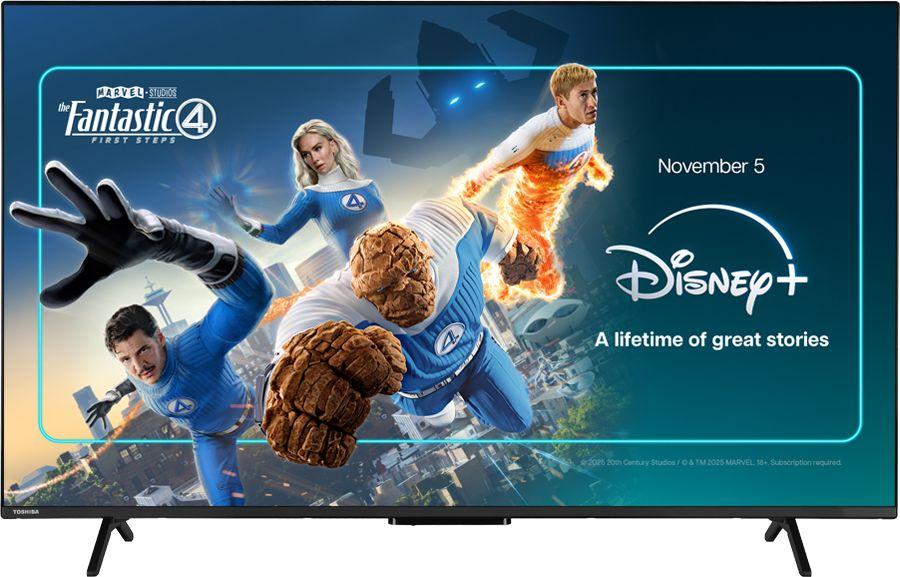
If you’re looking to upgrade your living room with a big, sharp and sensibly priced 4K TV, 55 inches is the current sweet spot. Sets like the Toshiba UV2F53DBU 55" 4K Ultra HD Smart Freely TV bring together ultra-high-definition picture quality, catch-up apps and the new Freely platform in a size that suits most UK homes. In this guide, we’ll walk through how to choose the right 55-inch TV, using the Toshiba UV2F53DBU as a useful reference point and comparing it with popular alternatives from Samsung, Hisense and LG.
Why 55 inches is the new standard TV size
A decade ago, a 40-inch TV felt big. Today, 55 inches has quietly become the default choice for many households. Prices have dropped, bezels have shrunk and living rooms haven’t got any smaller, so people are naturally filling the same space with a bigger screen.
The Toshiba UV2F53DBU sits bang in this mainstream zone: a 55-inch 4K LED TV designed to balance value, size and everyday usability. Most UK sofas sit roughly 2–3 metres from the TV, which is ideal for a 55-inch 4K set. At that distance, you actually start to see some of the extra detail that 4K offers over older Full HD TVs, without the picture feeling overwhelming.
If you’re moving up from a smaller set and are worried about the jump, it’s worth measuring the width of your TV unit or wall and marking out the size with tape. For many people, what sounds huge on paper turns out to be “just right” once it’s in the room.
Understanding 4K and LED: what to expect day to day
Almost every 55-inch TV you’ll see these days will be 4K and LED, including the Toshiba UV2F53DBU. So what does that actually mean for day-to-day viewing?
4K (Ultra HD) simply means there are roughly four times as many pixels as an older 1080p Full HD screen. On a 55-inch TV, that extra resolution shows up as:
- Sharper detail in nature documentaries and films
- More refined textures in games, especially on newer consoles
- Cleaner edges on graphics and on-screen text
LED refers to the way the TV is lit. The Toshiba UV2F53DBU, along with alternatives like the Samsung U7000F 55" 4K Ultra HD Smart TV, Hisense A6Q 55" 4K Ultra HD Smart Freely TV and LG UA73006 55" 4K Ultra HD Smart TV, uses an LED backlight behind an LCD panel. This is the most common type of TV today and it typically offers:
- Bright images that cope well with daylight
- Reasonable contrast for mixed TV and streaming
- Good efficiency compared with older plasma sets
You won’t get the inky blacks of high-end OLED screens, but for the price bracket these 55-inch LED models aim at, the picture quality is more than good enough for most households, especially when paired with 4K content.
What is a Freely TV and why does it matter?
One of the headline features of the Toshiba UV2F53DBU is that it’s a Freely TV. Freely is a new UK TV platform designed to bring together live channels and catch-up in one interface, delivered over your broadband connection. Instead of relying solely on an aerial, it leans into streaming for live TV as well.
If your home has decent internet but patchy aerial reception, a Freely-ready set makes a lot of sense. It also tidies up the experience if you’re used to hopping between apps for live channels, catch-up and on-demand shows. The Hisense A6Q 55A6QTUK is another 55-inch Freely TV worth considering, and you can learn more about how that model handles the platform in our in-depth Hisense A6Q review.
If you prefer a more traditional approach, sets like the Samsung U7000F 55-inch and LG UA73006 55-inch lean on their own smart TV platforms, with Freeview-style tuners and a familiar list of UK apps. In practice, both routes give you a similar mix of BBC iPlayer, ITVX, Channel 4, My5 and major streaming apps, but the menus and navigation feel slightly different.
The Toshiba UV2F53DBU: who it suits best
The Toshiba UV2F53DBU 55" 4K Ultra HD Smart Freely TV is aimed squarely at families and viewers who want an affordable big-screen upgrade without losing the simplicity of traditional broadcast TV. With a rating of 4.9 from over 100 reviews at the time of writing, it’s clearly landing well with buyers.
If you’re curious about picture processing, smart features, remote design and menu speed, it’s worth taking the time to read our full review of the Toshiba UV2F53DBU 55" 4K Ultra HD Smart Freely TV. There we dive into how it handles everyday broadcast TV, streaming, films and sport in more detail.
In broad terms, this Toshiba model makes most sense if:
- You want a 55-inch 4K TV at a sensible price point
- You like the idea of Freely for live and on-demand UK channels
- You’re more interested in an easy, consistent interface than chasing every cutting-edge spec
Because it’s a mainstream LED set rather than a flagship, it also pairs well with an affordable soundbar if you’d like a bit more impact from films and football.
Comparing alternative 55-inch 4K TVs
The Toshiba UV2F53DBU doesn’t exist in a vacuum. If you’re shopping around, a handful of other 55-inch 4K TVs at similar prices are worth weighing up, each with their own strengths.
Samsung U7000F 55" – slick interface and strong app support
The Samsung U7000F 55" 4K Ultra HD Smart TV typically appeals if you value a polished smart TV experience. Samsung’s interface is clean, responsive and tends to get major streaming services first, which makes it a solid choice if you live in Netflix, Disney+ and Prime Video.
It’s a natural alternative if you’re not fussed about Freely but care more about a smooth, app-first experience. If you want to see how it stacks up in picture and sound terms, have a look at our Samsung U7000F 55-inch review for a deeper dive.
Hisense A6Q 55" – another Freely option to compare
The Hisense A6Q 55" 4K Ultra HD Smart Freely TV is the closest rival to the Toshiba UV2F53DBU in this group, because it also puts Freely front and centre. With a large number of user reviews and a strong average rating, it’s clearly one of the most popular Freely sets on the market.
If you like the Freely concept but want to weigh up different takes on picture processing, motion handling and build quality, it makes sense to compare the two side by side. Our detailed Hisense A6Q review highlights where it excels and how it behaves in real homes.
LG UA73006 55" – a good option for smart features and streaming
The LG UA73006 55" 4K Ultra HD Smart TV offers LG’s own smart platform, which is known for being user-friendly and well stocked with apps. It’s a good fit if you’re already used to LG TVs or you like having a home screen that puts streaming front and centre.
If you’re still undecided between the Toshiba’s Freely approach and a more traditional smart TV layout, our full LG UA73006 review can help you compare how menus, recommendations and apps are organised in day-to-day use.
When a 50-inch 4K TV might make more sense
Of course, 55 inches won’t be right for every room. If wall space is tight, you’re sitting very close, or you’d prefer something slightly more discreet, a 50-inch TV can be a smarter compromise. You still get the benefits of 4K, but in a slightly neater footprint.
The Samsung U7000F 50" 4K Ultra HD Smart TV is a great example. It offers much the same smart platform and overall feel as the 55-inch Samsung U7000F, just scaled down in size and price. If you’re torn between the more cinematic feel of 55 inches and the manageability of 50 inches, it’s worth browsing our Samsung U7000F 50-inch review to see how it fits into real homes.
If, after measuring your space, you decide that 55 inches will work, the Toshiba UV2F53DBU stays firmly in the running. If you find the tape marks sprawling a bit too far towards your room’s corners, stepping down to 50 inches could feel more balanced.
Key things to check before you buy a 55-inch TV
Regardless of which model you’re leaning towards, there are a few practical checks worth making before you commit.
1. Stand width and leg position
Many 55-inch TVs use wide-set feet rather than a central pedestal. Make sure your TV unit is wide enough and deep enough to support them. If you’re looking at the Toshiba UV2F53DBU 55-inch, check the product images and dimensions so you know how far apart the legs sit, especially if your furniture is on the narrower side.
2. Wall-mount compatibility
If you plan to wall-mount your TV, confirm the VESA pattern and weight first. Most 55-inch 4K LED sets share common mounting patterns, but you’ll still want to match your bracket to the correct size and weight rating. Allow space for cables and, if you’re adding one, a soundbar underneath.
3. HDMI inputs and devices
Think about how many devices you’ll connect: consoles, set-top boxes, sound systems and Blu-ray players all compete for ports. Three HDMI ports is usually a comfortable minimum for a modern family setup. Check how many HDMI and USB sockets each TV provides and whether any are easily accessible from the side if you plan to wall-mount.
4. Wi-Fi and network reliability
Because sets like the Toshiba UV2F53DBU and Hisense A6Q lean on Freely and streaming, a reliable broadband connection is vital. If your router is far from the TV, consider whether you can run an Ethernet cable or use powerline adapters to improve stability, especially for 4K streaming.
Making the most of a new 55-inch Freely or smart TV
Once your new TV is in place, a bit of setup time can significantly improve your experience. Here are a few simple tweaks that often pay off:
- Choose a sensible picture mode: Standard or Cinema modes usually look more natural than Vivid or Dynamic, which can be overly bright and harsh.
- Turn down motion smoothing if needed: If films look too “soap opera” like, dive into the settings and reduce motion interpolation.
- Enable energy-saving settings wisely: Auto brightness modes can help in bright rooms, but if the picture seems dim, try relaxing them slightly.
- Organise your apps: On Freely or other smart platforms, move your most-used streaming apps to the front of the row for quick access.
For a closer look at how the Toshiba UV2F53DBU behaves after these tweaks – and how it compares against direct rivals – you can read our full Toshiba UV2F53DBU 55" review with hands-on impressions.
Sound: when to add a soundbar
All of the TVs mentioned here have built-in speakers, and for day-to-day TV, news and casual watching they’re generally fine. However, as screens have got slimmer, there’s less room for speaker drivers, which means bass and clarity can struggle with big action scenes or dramatic soundtracks.
Signs you might want a soundbar include turning the volume up just to hear dialogue or constantly juggling volume during films. Even a modest soundbar can transform the experience, and they connect easily via HDMI ARC/eARC or optical. If you’re budgeting for a new TV like the Toshiba UV2F53DBU or Samsung U7000F, it’s worth keeping a small slice of your budget aside for audio if you care about cinema-style sound.
Which 55-inch TV should you choose?
If you’ve decided that 55 inches is the right size, your choice mostly comes down to how you like to watch and which interface fits your household best. The Toshiba UV2F53DBU 55" 4K Ultra HD Smart Freely TV is a strong option if you want Freely’s integrated approach to live and on-demand channels, partnered with a well-liked 4K LED screen at a competitive price.
For a polished, app-first smart experience, the Samsung U7000F 55-inch is a natural alternative. If you want to compare different Freely implementations, the Hisense A6Q 55-inch Freely TV should also be on your shortlist, while the LG UA73006 55-inch is a good pick for those who like LG’s smart layout and app support. If you’ve measured up and found that 55 inches is just a bit too large, the Samsung U7000F 50-inch offers a very similar experience in a smaller frame.
Whichever way you’re leaning, taking a few minutes to compare these models in more detail will help you buy with confidence. Follow the links to our in-depth reviews to see how each TV performs in real homes, then choose the one that best fits your space, your viewing habits and your budget.