
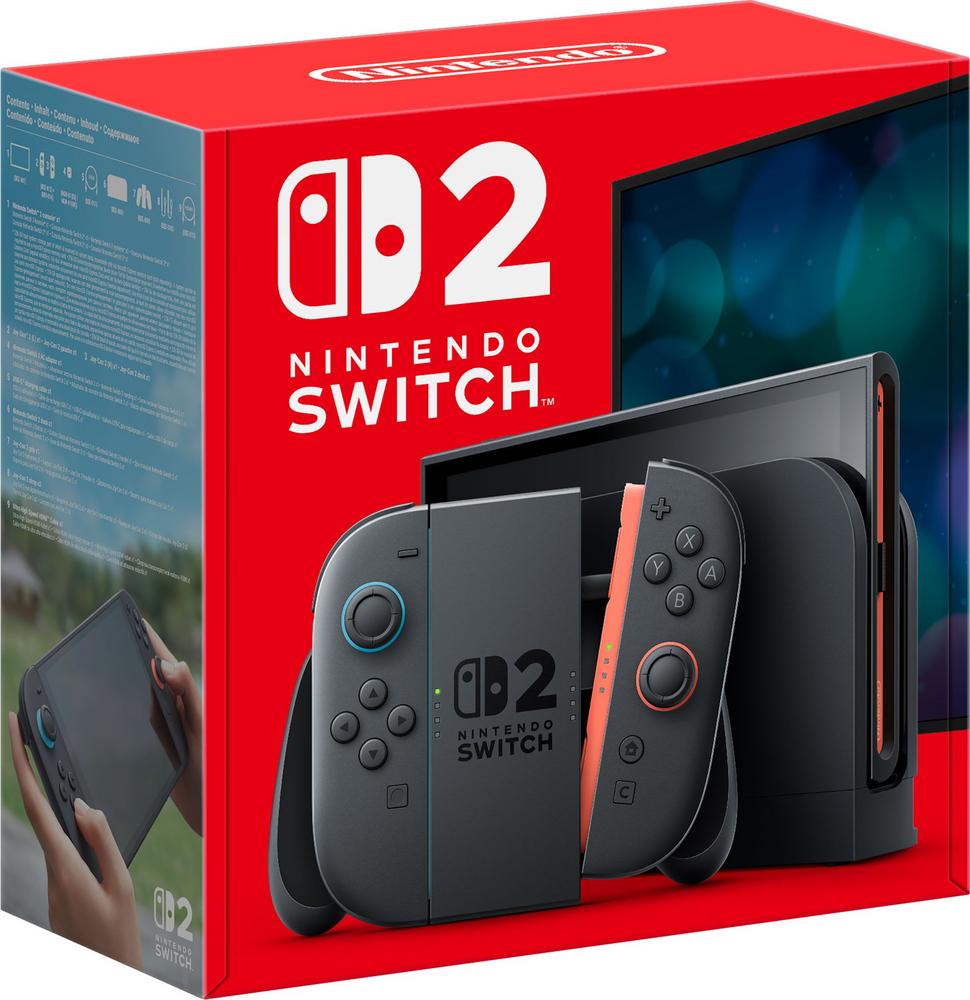
If you love the idea of switching from big-screen family races to handheld gaming on the sofa, the Nintendo Switch 2 era of consoles is made for you. The Nintendo Switch 2 256GB with Mario Kart World – Black, Black keeps things simple for new buyers: you get the console, a generous chunk of storage and one of the most accessible racing games around, all in one box. This guide walks through what you can expect from a modern hybrid console like this, how to set it up for family fun, and how to decide if it’s the right way to start – or refresh – your gaming setup.
What the Nintendo Switch 2 256GB with Mario Kart World bundle actually gives you
This bundle pairs a Nintendo Switch 2 console in black with 256GB of built-in storage and Mario Kart World included. For first-time buyers, that saves you from choice overload and lets you start playing as soon as you’re set up. Mario Kart remains one of the most approachable games for mixed-age households, so it’s a smart pairing for families and casual players as well as people who just want quick, fun races after work.
If you want detailed specifications, compatibility notes and a closer look at build quality, you can read our full review of the Nintendo Switch 2 256GB with Mario Kart World, where we cover the hardware in depth. Here, we’ll focus on ownership, setup and getting the best value from a console like this.
Understanding hybrid consoles: why the Switch 2 style is so popular
Hybrid consoles have found a sweet spot between traditional living-room boxes and handheld devices. Docked, they plug into your TV for big-screen gaming; undocked, they work like a powerful handheld that you can take around the house or on the go. That flexibility is a big reason the Nintendo Switch family has enjoyed such long-lasting appeal.
For many UK households, space is tight and not everyone wants a big black box permanently under the telly. A compact console that can disappear into a drawer when not in use is a genuine plus. It also makes it easier to share: someone can watch TV on the main screen, while someone else continues their game in handheld mode without an argument over the remote.
Is 256GB storage enough for your style of gaming?
The bundle’s 256GB storage is generous by handheld standards, but how far it stretches depends on how you buy and play your games. Large AAA releases can easily run into tens of gigabytes each, while smaller indie titles and retro-style games barely make a dent in your capacity.
As a rough guide, a 256GB console can comfortably hold:
- A mix of 8–15 larger modern games plus a stack of smaller indie titles, or
- Mostly cartridge-based games, with digital space reserved for favourites you always want installed.
If you like rotating through a big library, you have a couple of simple tricks to keep things tidy:
- Delete games you’re not currently playing – you can re-download them later without losing your save data.
- Focus on physical cartridges for huge games, keeping storage for digital-only releases and smaller downloads.
- Add a compatible memory card later if you discover you’re always running out of space.
For most new buyers picking up the Nintendo Switch 2 256GB with Mario Kart World, that 256GB starting point is more than enough to avoid storage stress in the first couple of years.
First-time setup tips: from box to first race
Getting your console from box to first race doesn’t need to be fiddly, but a few simple choices will make life easier down the line.
1. Decide where the dock will live
Because the Switch 2 concept is built around a dock for TV play, think about where it’ll live before you start plugging cables in. Ideally, the dock should sit close enough to your router for a stable connection, and somewhere the console can be slotted in and out without knocking over ornaments or yanking cables.
Once you’ve chosen a home, connect the HDMI cable to your TV and the power supply to a free plug socket. Tidy the cable run now, as you’re likely to keep this setup for years.
2. Create or link user accounts carefully
On first switch-on, you’ll be nudged through language, region and user account setup. Take your time here:
- Give each main player their own user profile for clean saves, stats and preferences.
- If children will be using the console, set up parental controls and restrict online features and purchases as needed.
- Use a strong password and link an email so you don’t lose access to digital purchases later.
3. Let updates run before the big family race
New consoles and games almost always have launch-day updates. It’s tempting to skip these when everyone is impatient to start Mario Kart, but allowing the console to update reduces the chance of hiccups mid-game. If you’ve got slower broadband, consider setting it all up earlier in the day so the first proper play session runs smoothly.
Making the most of Mario Kart World in a family setting
Mario Kart has long been the go-to option for family racing nights because almost anyone can join in, even if they never play games otherwise. Mario Kart World continues that tradition with simple controls layered over tactics and track knowledge for those who want to master it.
To make family sessions smoother:
- Enable driving assists and simpler controls for younger players so they’re not constantly falling off the track.
- Stick to lower engine classes at first – the slower speeds are more forgiving and help people learn the tracks.
- Mix team races with free-for-all modes so less confident players can still feel part of a win.
Because the console is portable, you can also hand it over in handheld mode to keep kids entertained on long journeys – just remember to pack a charger or power bank.
Accessories that genuinely improve your experience
It’s easy to get lost in accessory lists, but you don’t need everything under the sun. A few carefully chosen add-ons can genuinely improve life with a hybrid console.
- Carry case: Essential if the console will leave the house. Look for one with padded compartments for the console and extra slots for game cartridges.
- Screen protector: A simple, inexpensive way to avoid the grief of permanent scratches.
- Extra controllers: The console’s default controllers can usually be split for two-player races, but a second set makes four-player sessions much more comfortable.
- Memory card: Not mandatory at the start, but useful if you quickly move towards a digital-only library.
These basics pair well with the Nintendo Switch 2 256GB with Mario Kart World bundle and mean you’re less likely to regret not protecting your investment later.
Buying tips: how to tell if this bundle is the right choice for you
With consoles, it’s rarely about a single “best” option, but rather the right fit for your budget and how you play.
You’ll likely love this bundle if…
- You want a straightforward, good-value way into hybrid console gaming.
- Mario Kart-style racing appeals to your household and you’re happy starting with a family-friendly favourite.
- You like the idea of switching between TV and handheld play without juggling multiple devices.
- You’re not yet sure how many other games you’ll buy and want a sensible storage starting point.
You might want to look at other options if…
- You will only ever play docked to a TV and don’t care about handheld play.
- You’re planning to build a very large digital library quickly and would rather start with more storage or commit to buying a memory card from day one.
- You’re not interested in racing games at all and would prefer a different bundled title.
For a closer breakdown of how this specific bundle performs day to day, including noise levels, comfort in handheld mode and display quality, head to our in-depth Nintendo Switch 2 256GB with Mario Kart World review.
Online play, subscriptions and staying in control of costs
Most modern consoles, including hybrid systems like the Nintendo Switch 2, lean heavily on online features. That’s especially true for competitive games such as kart racers, where online lobbies and tournaments keep things fresh long after you’ve unlocked every track.
However, online play may require a separate subscription. Before you sign up, consider:
- How often you’ll play online: If racing online is a weekly thing, the subscription will feel like good value; if you only dabble, you might not need it year-round.
- Family use: Some memberships include family plans, which can be cheaper than buying individual accounts.
- Downloadable content (DLC): Extra tracks, characters or cosmetic items can add up; decide in advance what you’re happy to spend each month.
Parental controls on modern consoles let you lock down spending, limit online play and manage screen time. It’s worth setting these up on day one, especially if children will have regular access.
Keeping your console in good condition for years
Consoles might not need as much maintenance as white goods, but a little care goes a long way. Dust, knocks and spills are the main threats.
- Keep the dock and vents clear: Avoid stacking other devices directly on top of the console or dock, and dust the area regularly so vents don’t clog.
- Dock gently: Get into the habit of guiding the console into the dock straight on rather than dropping it in at an angle.
- Avoid drinks near controllers: Sticky buttons are one of the most common complaints and are largely preventable.
- Update firmware: Software updates often improve stability and can even add features over time.
Handled sensibly, a hybrid console like the Nintendo Switch 2 can last for many years, surviving house moves, growing children and evolving game libraries.
Long-term value: why bundles can make more sense than buying separately
When you factor in the cost of a console, a popular game and sometimes a starter accessory or two, bundles often represent better value than piecemeal buying. The Nintendo Switch 2 256GB with Mario Kart World – Black, Black is a good example of a no-fuss way to get started: you pay once, plug everything in, and you’re playing a top-tier racer within the hour.
Even if you eventually expand with extra controllers, a memory card and more games, starting from a solid, good-value base means you’re less likely to feel that every extra purchase is an uphill climb. And because Mario Kart-style racers tend to hold their appeal across age groups, there’s little risk of the included game being something you’ll quickly tire of.
Final thoughts
The Nintendo Switch 2 256GB with Mario Kart World bundle is built around a simple idea: one box that gives you a versatile console and a game you can enjoy straight away with friends and family. If you’re looking for a hybrid system that feels at home both under the TV and in your hands, it’s an easy option to put on your shortlist.
Before you buy, think carefully about how much storage you really need, how often you’ll play online and whether you want to add accessories like a carry case and extra controllers from day one or over time. When you’re ready to dig into the nitty-gritty details – including real-world impressions and performance – you can always read our full review of the Nintendo Switch 2 256GB with Mario Kart World to round out your decision.