
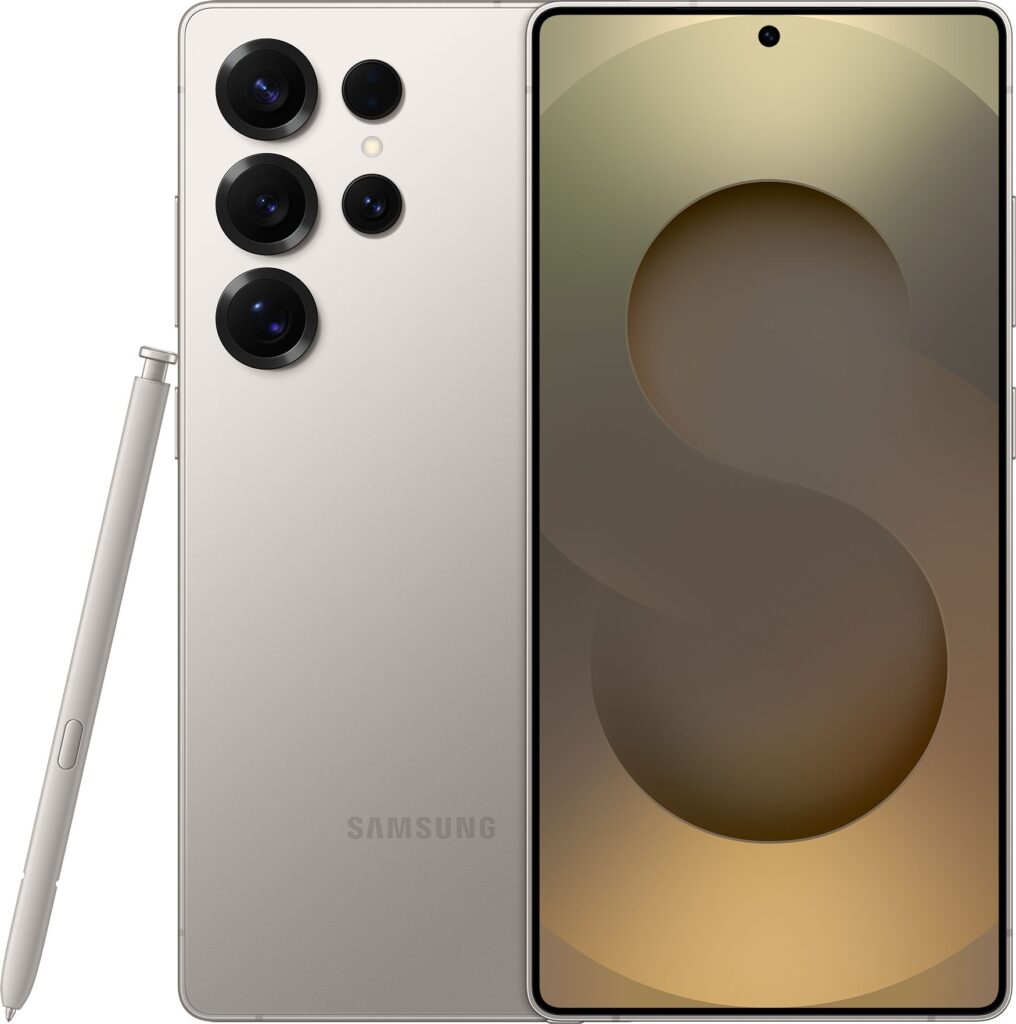
If you use your phone as your camera, games console, notebook and TV, choosing the right model is a big decision. The Samsung Galaxy S25 Ultra 1TB Smartphone in Titanium Black is very much aimed at people who want their next handset to be a serious long‑term investment. In this guide, we’ll look at what living with a huge‑storage flagship actually means, how it compares with the 512GB versions of the same phone, and how to decide which capacity is right for you. Along the way we’ll highlight who each option suits best, and point you towards in‑depth reviews if you want all the fine detail.
Understanding the Galaxy S25 Ultra range
The Galaxy S25 Ultra line sits at the very top of Samsung’s smartphone family, with big, bright displays, powerful cameras and premium materials. The Titanium Black 1TB version adds one headline feature: more local storage than many laptops. That makes it a strong candidate if you want to keep everything with you without worrying about clearing space every few months.
If you’d like a detailed breakdown of design, camera performance and battery life, you can read our full review of the Samsung Galaxy S25 Ultra 1TB Smartphone in Titanium Black. Here, we’re focusing instead on everyday ownership and how it stacks up against the 512GB alternatives in different colours.
1TB vs 512GB: which storage size fits your life?
Storage is the main reason to choose between the Titanium Black 1TB model and the various 512GB versions. On paper, both look generous, but the right choice depends heavily on how you use your phone today – and how you expect to use it in three or four years’ time.
When 1TB makes a lot of sense
The 1TB Galaxy S25 Ultra is best seen as a long‑term content vault in your pocket. It’s tailor‑made if you:
- Regularly shoot high‑resolution photos and long 4K or 8K videos
- Download entire TV series and films for offline viewing
- Play large, graphics‑heavy games that can run to tens of gigabytes each
- Want to keep years’ worth of photos, videos, notes and documents offline
- Prefer not to micromanage storage or rely on cloud connections
The extra headroom means you’re less likely to see those annoying “storage almost full” warnings just when you’re trying to film something important. It also helps the phone stay responsive longer term, as the system has more free space to work with for updates and apps.
If this sounds like your ideal setup, it’s worth spending a few minutes with our hands‑on impressions – you can explore the full Galaxy S25 Ultra 1TB Titanium Black review here.
Who 512GB is ideal for
The 512GB Galaxy S25 Ultra models strike a strong balance between capacity and price. They’re particularly appealing if you want an ultra‑premium phone but don’t see yourself realistically filling 1TB.
Good candidates for 512GB include people who:
- Mostly stream music and video instead of downloading them
- Take plenty of photos, but not hours of footage every week
- Play some games but not half the app store at once
- Are happy to back up and occasionally tidy old files to the cloud
Within the 512GB range you’re essentially choosing colour and finish. The following options are worth a look:
- Samsung Galaxy S25 Ultra 512GB Smartphone in Titanium Silverblue – ideal if you like a lighter, more eye‑catching aesthetic.
- Samsung Galaxy S25 Ultra 512GB Smartphone in Titanium Black – keeps the same stealthy look as the 1TB hero model but with half the storage.
- Samsung Galaxy S25 Ultra 512GB Smartphone in Titanium Whitesilver – a crisp, modern finish that stands out without being loud.
- Samsung Galaxy S25 Ultra 512GB Smartphone in Titanium Grey – a subtle mid‑tone option that hides marks a little better than pure black.
All of these share the same core Ultra experience, so your decision largely comes down to storage preference and styling.
Living with a big‑screen Ultra phone every day
Regardless of storage, an Ultra‑class smartphone is a particular kind of device: large, powerful and designed to handle just about everything you throw at it. Before focusing too much on numbers, it’s worth thinking about what day‑to‑day life with a big‑screen handset is really like.
Comfort, reach and pocketability
A large display is brilliant for films, games and spreadsheets, but it can be a stretch for small hands. Expect to use two hands more often – especially for typing near the top of the screen. If you tend to walk and text or use your phone one‑handed on public transport, it’s worth considering how comfortable that will feel with an Ultra‑sized device.
On the other hand, if you often work from your phone, review documents or multitask with split‑screen apps, the extra real estate is a real productivity boost compared with compact models.
Stylus and creativity potential
Ultra‑tier phones often support a stylus, turning the big display into a digital notepad or sketchbook. This is especially handy for:
- Handwritten meeting notes
- Scribbling diagrams or mind‑maps
- Annotating PDFs and documents on the go
- Casual sketching and digital art when inspiration strikes
It’s a feature that tends to be under‑used but quickly becomes hard to live without once you’ve integrated it into your workflow. If you think you’d only use a stylus occasionally, the 512GB models will feel just as capable as the 1TB version – your choice there is really about storage comfort rather than capability.
Planning for three to five years of ownership
Flagship smartphones are expensive, and it makes sense to keep them for as long as they’re supported with security updates. When weighing up 1TB against 512GB, it’s helpful to think about not just this year, but where your habits might be heading.
Growing file sizes and app demands
Over time, apps tend to grow larger as they add features and richer graphics. Camera resolutions creep up, video quality improves, and even messaging apps gradually hoard ever larger caches of photos, stickers and clips. A phone that feels spacious on day one can start to feel tight by year three.
Choosing 1TB on the Galaxy S25 Ultra is a way of future‑proofing against that creep. You’re effectively pre‑paying for peace of mind that you can keep shooting and installing without a second thought. With 512GB you can still be perfectly comfortable, but a little occasional housekeeping will help keep things smoother in the long run.
Resale value and longevity
Higher‑capacity models often hold their value slightly better on the second‑hand market, simply because they’re rarer and appeal to heavy users. If you like to sell or trade in your phone after a few years, the extra storage can reclaim some of the original outlay later.
That said, for many buyers, the sweet spot for total cost of ownership still lies with 512GB versions like the Titanium Silverblue or Titanium Grey variants. You’re getting the same flagship hardware and long software support, just with a more sensible capacity for typical use.
Making the most of 1TB on the Galaxy S25 Ultra
If you do opt for the 1TB Titanium Black model, it’s worth putting that massive storage to good use from day one. Here are some practical ideas.
Turn it into your main camera and camcorder
A huge part of a modern flagship’s appeal is its camera system, and having 1TB at your disposal means you no longer need to ration your creativity. You can:
- Shoot long trips, gigs and family events in high resolution without constantly checking remaining storage
- Keep multiple versions of the same scene – RAW photos, processed edits and short social clips
- Store years of memories locally so they’re instantly accessible even when you’re offline abroad
Just remember to keep backing up. Extra storage doesn’t replace the need for a good cloud or local backup routine; it just gives you more breathing room between tidying sessions.
Carry your entertainment library with you
For frequent travellers or commuters with unreliable signal, 1TB makes it easy to use your phone as a true media hub. Think in terms of:
- Entire box sets and films downloaded from your favourite streaming apps
- Offline playlists or lossless music files for better audio quality
- Downloaded podcasts and audiobooks for long journeys
This approach is especially handy on flights and in signal‑dead spots. While a 512GB model can still store a lot, 1TB lets you be generous without worrying that a few downloads will eat a big chunk of your remaining capacity.
Use it as a portable work drive
If you regularly handle large documents, presentations or design files, a 1TB phone can double as a pocket‑sized work drive. Sync key folders for offline access so you can review or present even when your laptop is not handy. It’s a nice productivity bonus that makes the most of the Ultra’s screen size and power.
Colour choices: does finish really matter?
While storage and performance are the practical concerns, it’s worth acknowledging that you’ll be looking at your phone dozens of times a day. Colour and finish are more important than many people admit when they’re initially scanning spec sheets.
The 1TB model we’re focusing on here comes in Titanium Black – a classic stealthy look that pairs well with almost any case. It hides most marks and scuffs, and has a more understated, professional style.
The 512GB alternatives add personality:
- Titanium Silverblue offers a slightly cooler, more playful feel while still looking premium.
- Titanium Whitesilver delivers a clean, modern appearance that stands out on a desk or table.
- Titanium Grey sits in between – less stark than white, less bold than black, and often very forgiving of everyday wear.
If you tend to keep your phone in a case, the colour will mostly peek through around the camera and edges. In that case, prioritise storage and price first, then pick the finish that appeals most once you’ve narrowed down your shortlist using the in‑depth reviews linked above.
Managing storage smartly on any Galaxy S25 Ultra
Whether you choose 1TB or 512GB, a few simple habits will help your phone stay snappy and organised over its lifetime.
Set up automatic backups and sync
Enable automatic photo backup to your preferred cloud service and check the settings so full‑resolution images are safely stored. This gives you the freedom to delete older items from the device without fear of losing them. For documents and work files, consider using cloud folders so anything you edit on the phone also updates on your laptop or tablet.
Audit your apps a couple of times a year
It’s easy for unused apps and games to accumulate quietly in the background. Every few months, scan through your installed apps and remove anything you haven’t opened recently. Large games, offline map packs and editing apps can be particularly heavy, and clearing even a handful can free tens of gigabytes at once on a 512GB model.
Clear cached files from time to time
Streaming apps, social networks and browsers build up caches that can run into several gigabytes over time. Most phones provide a way to see which apps are using the most storage and to clear cached data safely. Doing this occasionally keeps things tidy and can resolve glitches without affecting your main files.
Alternative S25 Ultra options worth exploring
If you like the idea of an Ultra‑class phone but you’re still undecided on capacity and colour, it’s worth digging into the individual model write‑ups. Each of the following offers essentially the same core experience with slight twists:
- Read more about the Galaxy S25 Ultra 512GB in Titanium Silverblue if you’re leaning towards a lighter, distinctive finish.
- Take a look at the Galaxy S25 Ultra 512GB in Titanium Black for the same understated look as the 1TB hero, but at a lower capacity.
- Explore the Galaxy S25 Ultra 512GB in Titanium Whitesilver if you prefer a bright, modern appearance.
- Check out the Galaxy S25 Ultra 512GB in Titanium Grey if you want something subtle yet different from standard black.
Comparing these directly with the Galaxy S25 Ultra 1TB Titanium Black review will give you a clearer sense of whether that extra storage is worth the step up for your particular habits.
Final thoughts
Choosing between the 1TB Samsung Galaxy S25 Ultra in Titanium Black and the 512GB alternatives is less about raw power and more about how you live with your phone. If you want a device that can swallow years of photos, video and apps without breaking a sweat, the 1TB model makes a compelling, future‑proof case. If you’d rather balance cost and capacity, the 512GB versions in Silverblue, Black, Whitesilver or Grey offer all the same flagship strengths in a slightly more restrained package.
Whichever way you’re leaning, taking a few minutes to explore the linked in‑depth reviews will help you buy confidently. That way, when you finally unbox your new Galaxy S25 Ultra, you’ll know it’s the right long‑term companion for how you work, play and capture your everyday life.