
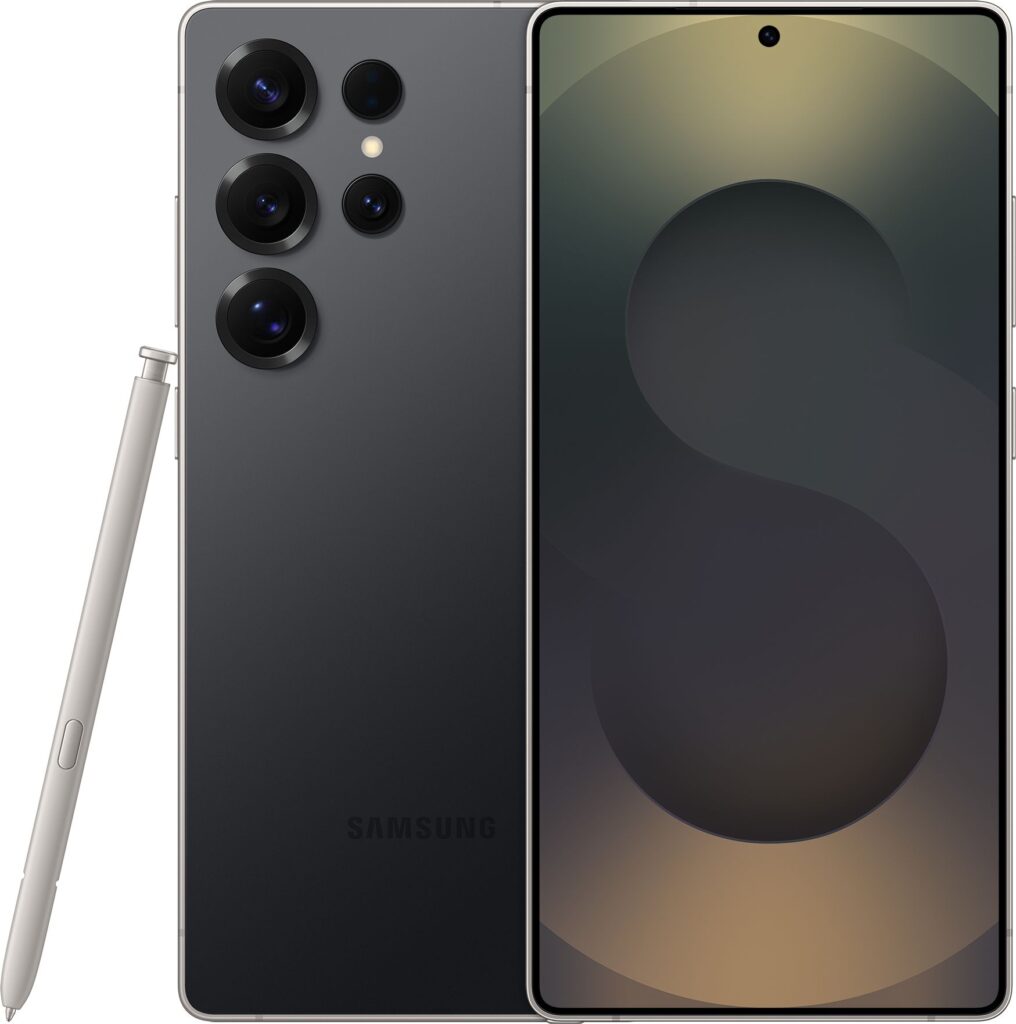
If you’re eyeing up a flagship Android phone, the Samsung Galaxy S25 Ultra range is likely near the top of your shortlist. The 1TB Samsung Galaxy S25 Ultra in Titanium Grey is the standout option for anyone who wants huge storage and a premium finish, but there are also 512GB versions in several colours that might suit your budget and style better. This guide walks through how to choose between them, what 1TB storage actually means in day‑to‑day use, and how to get the most from a big, powerful phone like this.
Meet the Samsung Galaxy S25 Ultra Range
The Galaxy S25 Ultra line is designed as an all‑round powerhouse: a big, bright display, a serious camera system and enough performance to handle gaming, multitasking and creative work. The Titanium Grey 1TB model gives you the same core experience as the rest of the S25 Ultra family, but with far more onboard storage than most people are used to.
If you want a deep dive into benchmarks, camera comparisons and real‑world testing, you can read our full review of the Samsung Galaxy S25 Ultra 1TB in Titanium Grey. Here, we’ll focus on helping you decide whether this model is right for you, or whether one of the 512GB alternatives is the smarter buy.
1TB vs 512GB: How Much Storage Do You Really Need?
Storage is the biggest decision with the S25 Ultra range. The hero model here, the Samsung Galaxy S25 Ultra 1TB Smartphone in Titanium Grey, gives you essentially laptop‑like space in your pocket. But do you actually need that much?
Who the 1TB S25 Ultra Is Perfect For
The 1TB configuration is overkill for light users, but ideal if you:
- Shoot lots of high‑resolution photos and long 4K or 8K videos.
- Play big games and like to keep many installed at once.
- Download films and TV to watch offline on flights and commutes.
- Prefer to keep years of messages, media and files on your phone instead of offloading to cloud storage.
If that sounds like you, the 1TB model gives breathing room so you are not constantly deleting apps or media to make space for the next big thing.
When a 512GB S25 Ultra Is the Smarter Choice
Many people will be better served by a 512GB model. You still get generous space for apps, photos and offline content, just at a lower price. In the S25 Ultra family, there are several 512GB options worth considering:
- Samsung Galaxy S25 Ultra 512GB in Titanium Silverblue – a lighter, more eye‑catching finish.
- Samsung Galaxy S25 Ultra 512GB in Titanium Black – a classic, understated look.
- Samsung Galaxy S25 Ultra 512GB in Titanium Whitesilver – clean and bright with a modern feel.
- Samsung Galaxy S25 Ultra 512GB in Titanium Grey – the same colour as the 1TB hero, with half the storage.
All of these share the S25 Ultra DNA; your main trade‑off is storage versus price. For most users who are happy to tidy up files occasionally or lean on cloud backups, 512GB is a very comfortable long‑term size.
Choosing the Right Colour and Finish
At flagship prices, it’s worth picking a finish you will still enjoy looking at in two or three years’ time. The Titanium Grey of the 1TB model is a safe, versatile option that looks professional in any setting and tends to hide minor marks well.
If you prefer something with a bit more personality, the 512GB range offers different shades:
- Titanium Silverblue balances a cool metallic look with a hint of colour, great if you want something subtle yet distinctive.
- Titanium Black is timeless and goes with any case or accessory you might add.
- Titanium Whitesilver feels lighter and more modern, ideal if you like your tech to stand out on a table.
Bear in mind that lighter finishes can sometimes show dirt or dye transfer from fabrics more easily, while very dark phones make smudges more noticeable. A clear or tinted case is an easy way to protect your phone while still enjoying the colour you paid for.
Why the S25 Ultra Range Appeals to Power Users
Looking beyond capacity and colour, all S25 Ultra models are built for people who demand more from their phones. The big display is made for multitasking, gaming and streaming, and the camera array is designed to replace a compact camera for most everyday shooting.
If you’re upgrading from an older or mid‑range device, you’ll notice the difference in areas such as low‑light photography, zoomed shots, and how quickly the phone switches between apps. The fact that the 1TB Titanium Grey model has attracted such a strong average rating from thousands of owners suggests that the real‑world experience matches the premium positioning. To see how it performs day to day, including camera samples and battery results, you can read our detailed hands‑on review of the 1TB Titanium Grey S25 Ultra.
Practical Tips for Living With a Large, Premium Phone
A phone like the S25 Ultra is an investment, and a big one. With a few sensible habits, you can keep it running smoothly and looking great for years.
Protecting the Screen and Body
A large display is brilliant for media and productivity but also more vulnerable to drops. Our suggestions:
- Fit a high‑quality case as soon as you unbox the phone, ideally one with raised edges around the screen and camera module.
- Add a tempered glass or film screen protector to guard against scratches and minor knocks.
- Avoid putting your phone in the same pocket or bag compartment as keys, coins or anything sharp.
This is particularly important if you are choosing one of the lighter finishes like Titanium Whitesilver or Silverblue, as scuffs and marks tend to be more visible.
Keeping Storage Under Control (Even at 1TB)
Having 1TB is liberating, but clutter can build up surprisingly quickly if you shoot a lot of video or install many games. To stay on top of things:
- Set your gallery to back up automatically to cloud storage, then occasionally delete older local copies.
- Remove large apps and games you no longer use rather than letting them sit idle.
- Clear downloaded files from messaging apps and browsers every few months.
These habits are just as useful if you go for one of the 512GB models, such as the Titanium Black or Titanium Grey variants, where space is still generous but not limitless.
Battery Life and Charging: Getting Through a Busy Day
The S25 Ultra is designed to last a full day of heavy use, but how you use it makes a big difference. A few tweaks can significantly extend your time between charges, whichever capacity or colour you choose.
Simple Ways to Extend Battery Life
To stretch the battery on your S25 Ultra:
- Enable a power‑saving mode when you know you’ll be away from a charger for a long time.
- Turn down screen brightness or use adaptive brightness so the phone adjusts automatically.
- Switch off features like 5G, Bluetooth and location when you don’t need them.
- Limit background activity for rarely used apps via the settings menu.
These changes have very little impact on the day‑to‑day experience but can mean the difference between nervously watching the battery icon and comfortably making it home.
Looking After Long‑Term Battery Health
To keep the battery healthy over the years:
- Avoid letting the phone regularly drain to 0% or sit at 100% on a charger for hours.
- Use quality chargers and cables that meet the manufacturer’s standards.
- Keep the phone out of direct sunlight and hot cars, which can accelerate battery wear.
A flagship like the S25 Ultra, whether 1TB or 512GB, deserves a bit of care so it still feels snappy and dependable three or four years down the line.
Making the Most of the Camera System
One of the main reasons to move up to the S25 Ultra range is the camera setup. Multiple lenses and advanced processing give you much more flexibility, especially in tricky lighting or when you want to zoom in without ruining the shot.
Everyday Tips for Better Photos
To get consistently good results:
- Clean the lenses regularly with a soft, lint‑free cloth.
- Use the dedicated night or low‑light modes when shooting indoors or at dusk.
- Experiment with the different zoom levels rather than relying on digital zoom.
- Try the portrait mode for people and pets to get a pleasing blurred background.
Remember that high‑resolution and long‑video modes can chew through storage, which is where the 1TB model shines. However, even the 512GB versions give plenty of room for keen photographers, especially if you back up to the cloud from time to time.
Comparing the S25 Ultra Models: Which One Should You Pick?
To narrow down your choice, think about three key areas: storage, style and price. Storage is the most practical difference, while colour and finish shape how the phone feels to you day to day.
If You Want Maximum Convenience
Go for the Samsung Galaxy S25 Ultra 1TB in Titanium Grey if you want to set up your phone once and not worry about space again. It’s particularly well suited to:
- Travellers who download lots of offline media.
- Content creators who shoot high‑quality video on their phone.
- Gamers who like to keep a big library installed.
You are paying extra for that peace of mind, but if you use your phone as your main camera, console and media player, it can be a very justifiable jump.
If You Want Flagship Features at a Lower Cost
The 512GB S25 Ultra options give you the same core strengths in a slightly more wallet‑friendly package. You can choose the finish that suits your taste:
- For a sleek but distinctive look, the Titanium Silverblue 512GB model is well worth a look.
- If you want classic and business‑friendly, the Titanium Black 512GB version keeps things subtle.
- For something bright and modern, the Titanium Whitesilver 512GB phone offers a clean, contemporary feel.
- If you like the hero model’s look but don’t need 1TB, the Titanium Grey 512GB option is a neat compromise.
In all cases, you keep the big display, advanced camera system and premium build that define the S25 Ultra range; you’re simply balancing capacity and cost.
Getting the Best Deal on a Premium Smartphone
Once you’ve chosen your ideal S25 Ultra model, it’s worth taking a little time to find the best value. Prices on high‑end phones can move around during sales events or when new models launch.
- Compare outright purchase prices with contract and finance options to see what really fits your monthly budget.
- Check trade‑in offers for your current device, which can significantly reduce the cost of stepping up to the S25 Ultra.
- Look at the total cost over the lifetime of your contract, not just the headline monthly figure.
And remember that paying slightly more for the right storage level – for example, stepping up from 512GB to 1TB if you genuinely need it – can work out cheaper in the long run than trying to work around constant space issues.
Final Thoughts
The Samsung Galaxy S25 Ultra line is built for people who expect a lot from their phones, whether that’s top‑tier cameras, a huge display or enough storage to rival a laptop. The 1TB Titanium Grey model sits at the top of that tree, offering room for just about everything you could want to store locally, while the 512GB variants in Silverblue, Black, Whitesilver and Grey give you the same core experience with a more approachable price tag.
If you’re still weighing things up, take a look at how the hero model performs in real life by heading to our in‑depth review of the Samsung Galaxy S25 Ultra 1TB in Titanium Grey, and explore the linked reviews of the 512GB options for more detail on each colour and configuration. With the right choice and a bit of care, any of these phones should serve you well for years to come.