
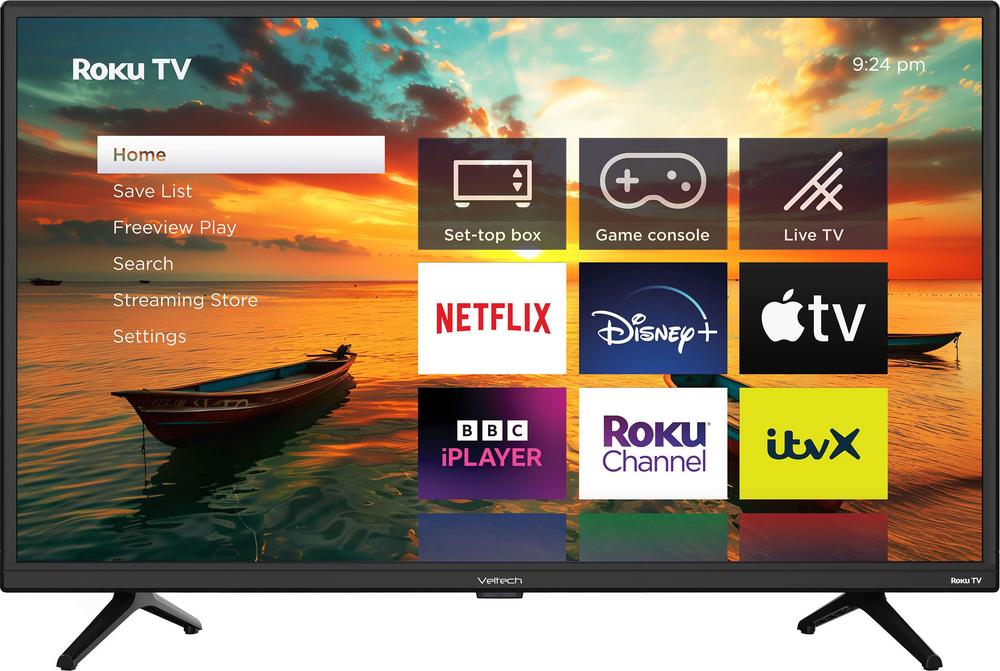
Compact smart TVs have quietly become some of the most useful screens in the home. Whether you want a TV for a spare room, a student flat, the kitchen or even a caravan, something like the Veltech HX230 24" HD Smart Roku TV offers streaming, catch-up and live TV in a space-saving package. In this guide, we'll use the Veltech HX230 as a starting point to explore what matters when choosing a smaller television, and how it stacks up against a few close alternatives.
Why a 24-inch smart TV can be the perfect second screen
A 24-inch TV hits a sweet spot for many homes. It's large enough to watch comfortably from the bed or across a small kitchen, but compact enough to sit on a narrow unit or worktop without taking over the room. You also tend to pay much less than you would for a big living-room set, while still getting access to all the main streaming services.
The Veltech HX230 24" HD Smart Roku TV sits exactly in this space. It's an HD smart TV with the Roku platform built in, so you get an easy-to-use interface and a strong line-up of apps in a petite frame. If you want to dive into the finer details, you can read our full review of the Veltech HX230 24" HD Smart Roku TV, but here we'll focus on how to decide if this type of TV is right for you and what else is worth a look.
Understanding screen size and where a 24-inch TV fits
Before you get caught up in apps and extras, it's worth thinking carefully about screen size and where the TV will live. Roughly speaking, a 24-inch screen is ideal for viewing distances of around one to two metres. That makes it a strong candidate for:
- Bedrooms, especially if you're watching from a bed or small sofa.
- Kitchens, where the TV often sits on a counter or wall bracket.
- Student accommodation or studio flats.
- Caravans, holiday homes and compact lounges.
If you know you'll sit a little further back, or you simply prefer a slightly larger picture, you might want to go up a step. Something like the Hisense A4Q 32" HD Smart TV or the LG LQ630B 32" 720p HD Ready Smart TV gives you a 32-inch screen, which can feel noticeably larger without overwhelming a modest-sized room.
HD Ready vs Full HD on smaller TVs
Resolution is another key decision. The Veltech HX230 is an HD smart TV, which in this size range usually means 720p or “HD Ready”. On a 24-inch screen, that offers a perfectly acceptable level of sharpness for day-to-day TV, streaming and casual gaming, especially if you sit a little way back.
If you want a step up in clarity, you might be more drawn to a 24-inch Full HD model like the Samsung F6000F 24" Full HD Smart TV [2025]. Full HD can make finer detail in films, sport and games look crisper, particularly when you're close to the screen. On the flip side, HD Ready sets can often work out cheaper, and many people find the difference subtle at this size.
At 32 inches, both the Hisense A4Q and LG LQ630B are also HD-level sets. Again, for broadcast TV, catch-up services and everyday streaming, this is usually enough. If you're not planning to sit right up close or use them as a PC monitor, resolution doesn't need to be your main concern.
Smart platforms: what Roku TV brings to the table
Where smaller TVs really vary is in their smart platforms. The Veltech HX230 stands out here by using Roku TV. Roku is known for its simple, tile-based home screen, broad app support and straightforward remote. That makes it a good fit for guest bedrooms, older relatives or anyone who doesn't want to wrestle with complex menus.
With Roku TV, you can typically expect quick access to popular streaming services, catch-up players and niche apps without having to plug in an extra streaming stick. If you'd like to see exactly how Roku feels to use on this set, our hands-on impressions are in the in-depth Veltech HX230 review.
By contrast, the alternatives here use different smart systems:
- The Hisense A4Q 32" HD Smart TV uses Hisense's own smart platform, typically focused on the main catch-up and streaming apps with a simple layout.
- The Toshiba WV2553DB 24" HD Smart Freely TV pairs a compact size with the Freely platform, which is centred around easy access to live and on-demand channels via broadband.
- The Samsung F6000F 24" Full HD Smart TV uses Samsung's Tizen interface, well-known for its polished design and wide app selection.
- The LG LQ630B 32" Smart TV runs LG's webOS platform, again offering a slick interface with good app coverage.
In practice, all of these will cover the basics. The right choice comes down to which interface you find most intuitive, and whether there are any particular apps you consider essential. Roku tends to excel at keeping things simple and consistent across different brands, which can be a selling point for the Veltech.
How these compact TVs compare on value and everyday usability
In the budget-friendly end of the market, small differences in price can matter, but it's helpful to look beyond the numbers and consider overall usability. The Veltech HX230 positions itself as an affordable 24-inch smart TV with an especially friendly Roku experience. With a very strong user rating and dozens of reviews, it clearly hits the mark for many people looking for a fuss-free second TV.
The Hisense A4Q 32" nudges the price up slightly but gives you a bigger 32-inch screen, making it a smart pick if you know you'll sit further back or want a more cinematic feel without moving into large living-room territory. The LG LQ630B generally sits a little higher again, but it brings LG's mature smart platform and a very large number of owner reviews, which can be reassuring if you like to buy something tried and tested.
If you want a 24-inch TV but are more focused on picture clarity than on the Roku interface, the Samsung F6000F stands out thanks to its Full HD resolution. Meanwhile, the Toshiba WV2553DB 24" is worth a look if you're attracted to the Freely platform and like the idea of an integrated approach to live and on-demand viewing over broadband.
Placement, stands and wall mounting tips
Once you've chosen a TV, it's worth thinking about where it will actually live. A 24-inch model like the Veltech HX230 is light and easy to move, which is ideal if you want to shift it between rooms or only get it out at certain times of the year, for example in a caravan.
For a more permanent setup, a slim wall mount can free up surface space and help with cable management. Just check the VESA mounting pattern of your chosen TV and make sure the bracket matches. Corner or swivel brackets can be particularly helpful in smaller rooms, where you may want to angle the screen towards the bed, dining table or breakfast bar.
If you plan to leave the TV on a stand, pay attention to the width and shape of the feet or central pedestal. Some compact TVs have widely spaced feet that need a wider unit, while others sit on a narrow central stand that fits smaller surfaces more easily.
Sound quality on small TVs and how to improve it
One area where compact TVs can struggle is sound. There simply isn't much physical space inside a slim 24- or 32-inch chassis for large speakers, so audio can sometimes lack depth and richness. The Veltech HX230 is no exception: while it's perfectly serviceable for everyday TV, you shouldn't expect room-filling cinema sound.
Fortunately, there are simple ways to improve things:
- Pair the TV with a compact soundbar that will sit neatly under the screen.
- Use Bluetooth to connect to a wireless speaker, if your model supports it.
- Connect the headphone output to a small hi-fi system or powered speakers.
Many 24- and 32-inch sets, including the likes of the Hisense A4Q, Toshiba WV2553DB, Samsung F6000F and LG LQ630B, offer at least one of these options. It's a worthwhile upgrade if you enjoy films, box sets or music in your secondary room.
Smart TV, Freeview and Freely: getting your channels sorted
Another practical consideration is how you plan to watch live TV and catch-up services. The Veltech HX230, like most modern smart TVs, offers apps for on-demand services alongside traditional aerial-based channels. If you want to reduce reliance on an aerial altogether, a Freely-based set like the Toshiba WV2553DB is designed to make live channels available via your broadband connection instead.
For many homes, though, a mix of Freeview and streaming is the most flexible setup. That way, you can rely on internet-based services when Wi‑Fi is strong, but still fall back on aerial channels if your broadband is patchy or you don't want to use data.
Gaming and connecting other devices
Even smaller TVs see plenty of use for gaming. A 24-inch screen can work very well with consoles in bedrooms or snug living spaces, and is also a good size for casual PC gaming without needing a dedicated monitor. When comparing models, look for at least a couple of HDMI ports so you can keep a console and perhaps a streaming box or Blu-ray player connected at the same time.
The Samsung F6000F's Full HD resolution may appeal if you're particularly focused on how games look. That said, many gamers are more concerned with input responsiveness than absolute resolution. While these entry-level TVs won't offer the ultra-fast gaming modes of high-end sets, keeping your console in a “Game” or “PC” picture mode and avoiding unnecessary image processing can help responsiveness feel snappier across all brands.
Choosing the right compact TV for your home
When you're shopping in the 24–32-inch range, it's easy to be overwhelmed by model numbers and marketing terms. A useful way to narrow things down is to start with how and where you'll watch, then choose a TV that aligns with that picture.
- If you want the simplest possible smart platform in a very compact 24-inch package, the Veltech HX230 with Roku TV is hard to ignore.
- If screen size matters more than interface, the Hisense A4Q 32" and LG LQ630B 32" give you extra inches for a modest step up in cost.
- If you sit close and want maximum sharpness at 24 inches, the Samsung F6000F Full HD is well worth a look.
- If broadband-based live TV and catch-up in one place appeals, the Toshiba WV2553DB with Freely is an interesting alternative.
From there, you can fine-tune your choice based on budget, brand preference and any particular apps or features you care about. Owner ratings and review counts can be a helpful extra nudge: consistently high scores over dozens or hundreds of reviews suggest a set that quietly gets the basics right.
Final thoughts
A well-chosen compact TV can transform a spare room, make lazy weekend mornings more enjoyable or bring streaming into spaces where you never thought a television would fit. The Veltech HX230 24" HD Smart Roku TV is a great example of how much you can now get from a smaller screen, especially if you value a straightforward interface and strong app support.
If you're leaning towards the Veltech but want a closer look at its picture, sound and software in day-to-day use, head over to our full hands-on review of the Veltech HX230 24" HD Smart Roku TV. And if you suspect a 32-inch set, a different smart platform or a Full HD screen might suit you better, don't forget to explore the linked reviews of the Hisense, Toshiba, Samsung and LG alternatives. With a little comparison, it's easy to find a compact TV that fits your room, routine and budget.