
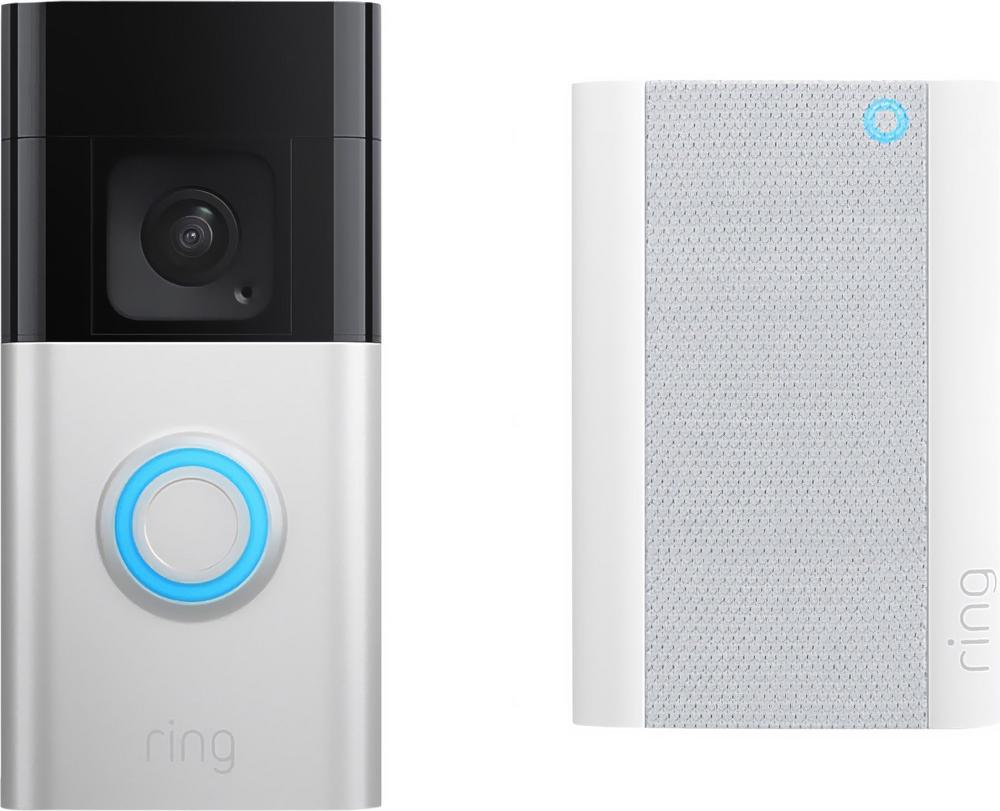
Smart doorbells have quickly gone from a gadget to something many homes now see as essential. Whether you want better security, peace of mind for deliveries, or just a convenient way to see who’s at the door from your phone, they can make a real difference to everyday life. The Ring Video Doorbell Pro 2 Plug-In Smart Doorbell HD+ 1536p in Nickel and Aluminium is one of the most advanced wired-style options around, and it’s a popular choice if you prefer a neat, always-powered setup.
This guide walks through what to think about before choosing a wired plug-in smart doorbell like the Ring Pro 2, how it fits into a modern front door, and when an alternative such as the Swann Buddy4K Smart Doorbell might make more sense. If you want to dive into every feature, you can also read our full review of the Ring Video Doorbell Pro 2 Plug-In Smart Doorbell HD+ 1536p once you’ve got the basics clear.
Wired plug-in vs battery smart doorbells: which suits you?
Most buyers start by asking whether they should go for a wired-style plug-in doorbell like the Ring Video Doorbell Pro 2 Plug-In, or a fully battery-powered unit. Both approaches have pros and cons, and getting this decision right makes the rest of your choice much easier.
Why a plug-in smart doorbell is appealing
The hero product here, the Ring Video Doorbell Pro 2 Plug-In Smart Doorbell HD+ 1536p, is designed to be powered from indoors via a plug, rather than relying entirely on a battery. That brings a few practical advantages:
- No battery recharging: Once it’s set up, you don’t have to remember to slide it off the wall and top up a battery every few months.
- Consistent power: A stable power supply is helpful for advanced features, more frequent motion detection and better responsiveness.
- Neat install: You get the clean, slim look of a wired unit without necessarily needing traditional doorbell wiring already in place.
If you hate the idea of your doorbell going offline because someone forgot to charge it, a plug-in model makes a lot of sense. You’ll find more detail on this in our hands-on impressions when you read our in-depth look at the Ring Video Doorbell Pro 2 Plug-In.
When a battery model might be better
Battery-powered smart doorbells are still the easiest option if you want to avoid any cabling work altogether. They’re handy if:
- You’re renting and don’t want to run cables through walls.
- Your nearest plug socket is far from the front door.
- You want the flexibility to move the doorbell later without leaving any trace.
Just remember that you’ll be trading that flexibility for a bit of ongoing hassle around charging. If you’ve already got plenty of gadgets competing for sockets indoors, the neatness of something like the Ring Video Doorbell Pro 2 Plug-In can still win out.
Understanding video quality and field of view
Once you’ve decided how you want to power your doorbell, picture quality is the next big feature to weigh up. The hero model here advertises HD+ 1536p resolution, which sits above standard 1080p and is designed to provide extra detail around faces and parcels.
Why resolution matters day to day
Higher resolution doesn’t just look nicer in the app. It also means:
- Clearer facial features when you zoom in on recordings.
- Better readability of logos, parcels and sometimes number plates.
- More flexibility to crop your view without losing too much clarity.
However, those detailed clips can use more data and cloud storage, so it’s worth checking your broadband package and data caps if you use mobile data a lot.
Comparing image quality to other options
Resolution is only part of the story. The Swann Buddy4K Smart Doorbell is a good example of a rival that puts headline image quality front and centre, with 4K recording as its big claim. It’s worth thinking about how much you truly need ultra-high resolution, versus a strong, balanced picture and reliable notifications.
If your priority is ultra-crisp clips, a 4K option like the Swann is worth a look. If you’re more interested in a well-rounded smart doorbell with a mature app ecosystem, the Ring Video Doorbell Pro 2 Plug-In’s HD+ 1536p resolution sits comfortably above the basics while still being manageable for most home networks.
Power, chimes and everyday practicality
With any wired or plug-in smart doorbell, it’s not just about the camera. How it fits into your home layout matters just as much.
Thinking about socket placement
The Ring Video Doorbell Pro 2 Plug-In Smart Doorbell needs a suitable indoor socket for its power supply. Before you buy, take a walk around your hallway or front room and check:
- Is there a free socket reasonably close to the front door?
- Can you route the cable neatly without creating a trip hazard?
- Are you happy to dedicate a socket permanently to your doorbell?
If the socket situation isn’t ideal, you might consider a battery model instead, or plan to tidy everything with cable clips and trunking.
Doorbell chimes and notifications
Most smart doorbells give you two main ways to know someone’s at the door: phone notifications and an indoor chime. Different brands handle this slightly differently, and it’s something to check before you commit.
With plug-in designs, the power supply and chime are sometimes combined, sometimes separate, and sometimes optional. Make sure you know whether you need to buy an additional chime unit, and whether you can adjust its volume and tones. If you’ve got a larger house, look for options that support multiple chimes or smart speaker integration so you don’t miss visitors at the back.
Smart features and app experience
Under the skin, today’s smart doorbells are essentially compact security cameras with a buzzer. What sets them apart is the app experience and smart features layered on top.
Motion detection that works for your home
Modern doorbells typically offer motion zones, person detection and custom alerts. The aim is to notify you when someone is actually approaching your door, not every time a car drives past.
With a plug-in model like the Ring Video Doorbell Pro 2 Pro 2 Plug-In HD+ 1536p, stable power helps to support more frequent motion checks and richer notifications. Spend some time after installation tweaking sensitivity and zones so that the doorbell learns what should and shouldn’t trigger an alert. This can dramatically cut down on false alarms and help your phone stay quiet unless it really matters.
Smart home integration
Another factor to consider is how well your doorbell plays with the rest of your tech. Many people now expect their smart doorbell to work with speakers, displays and even smart locks.
Before buying, think about:
- Which voice assistant or smart display you already use.
- Whether you want doorbell alerts to pop up on a TV or smart screen.
- If you plan to add other cameras or sensors from the same brand later.
The Ring ecosystem has become a popular choice precisely because it ties multiple devices together. If you’re planning a wider setup, that’s a strong reason to start with the Ring Video Doorbell Pro 2 Plug-In and build from there.
Subscriptions, storage and long-term costs
One thing that catches many first-time buyers out is the ongoing cost of storing video clips. Almost all smart doorbells now separate the hardware price from the subscription cost.
What usually comes for free
Many doorbells will still allow you to see a live view from the camera and receive motion alerts without paying a penny in subscription fees. That can be enough if you treat the doorbell as a modern buzzer and aren’t too worried about looking back at footage later.
When a subscription earns its keep
If you want to keep recordings for a few days or weeks, or share clips after an incident, a paid plan is usually required. With feature-packed models like the Ring Video Doorbell Pro 2 Plug-In or premium competitors such as the Swann Buddy4K Smart Doorbell, subscriptions often unlock:
- Cloud storage for video clips.
- More advanced notifications and rich previews.
- Extended video history and sharing tools.
Before you buy, look up the current plan pricing and decide whether you’re comfortable with that extra monthly cost. Spread over the lifetime of the doorbell, it may still feel like good value for the extra peace of mind.
Comparing the Ring Video Doorbell Pro 2 Plug-In with alternatives
Although our focus here is on the Ring Video Doorbell Pro 2 Plug-In Smart Doorbell HD+ 1536p, it’s worth knowing how it sits in the wider market. If you’re drawn to a wired-style, always-powered setup but aren’t sure it’s right for you, other models in a similar price bracket are worth shortlisting.
When to consider the Swann Buddy4K Smart Doorbell
The most obvious rival in this line-up is the Swann Buddy4K Smart Doorbell. This is a smart doorbell that pushes image quality very hard, and it’s a solid alternative if:
- You want the sharpest possible recordings and don’t mind larger file sizes.
- You’re already familiar with Swann security cameras or systems.
- You’re comparing mid-to-premium models and looking for the best fit for your budget.
Both the Ring and Swann options target buyers who care about more than just basic video and a ding-dong. The right choice depends on whether you prize app polish and ecosystem reach (which tends to favour Ring) or headline-grabbing resolution and integration with existing security gear (where the Swann Buddy4K can shine). For a deeper breakdown of the Swann’s strengths, you can read our detailed Swann Buddy4K review.
Planning your installation
Fitting a plug-in smart doorbell isn’t usually as daunting as people expect, but a little planning goes a long way. With the Ring Video Doorbell Pro 2 Plug-In, think through these points ahead of time.
Choosing the right mounting height and position
Most smart doorbells are designed to be mounted roughly at chest or shoulder height for the average adult. This generally gives a good view of faces and parcels. However, small changes in angle can make a big difference, so consider:
- Using wedge or corner mounts if your doorframe is recessed.
- Avoiding direct reflections from glass panels or strong backlighting.
- Checking that the field of view comfortably covers your doorstep and approach.
Once installed, walk towards your door from different directions while watching the live feed in the app, and adjust if necessary.
Cable routing and safety
Because the Ring Video Doorbell Pro 2 Plug-In is powered via a plug, you’ll need to route its cable from the indoor socket to the door area. Keep safety in mind:
- Use clips or trunking to keep the cable out of the way and protected.
- Avoid running cables across doorways or where they might get pinched.
- Label the plug if it’s on a busy extension lead, so it doesn’t get unplugged by accident.
If any part of the installation needs work on mains wiring or outdoor sockets, it’s worth consulting a qualified electrician.
Living with a smart doorbell day to day
Once the novelty of checking your door from your phone wears off, what really matters is how your smart doorbell fits into your routine. Plug-in models like the Ring Video Doorbell Pro 2 are designed to be invisible most of the time – simply part of the fabric of your home.
Reducing notification overload
Smart doorbells can quickly become annoying if they ping you every few minutes. After you’ve lived with yours for a few days, go back into the app and adjust:
- Motion sensitivity, especially if your door faces a busy street.
- Which motion zones are active.
- Whether you want alerts for every motion or just when the doorbell is pressed.
Fine-tuning these settings with a model like the Ring Video Doorbell Pro 2 Plug-In can turn a noisy, over-eager doorbell into a calm, well-behaved part of your smart home.
Making the most of video history
If you decide to take out a subscription, regularly reviewing your video history can help you spot patterns. For instance, you might realise what time parcels tend to arrive, or see which neighbours pop by most often. In the event of a missed delivery or suspicious activity, having clear, timestamped clips ready to go is invaluable.
Is the Ring Video Doorbell Pro 2 Plug-In right for you?
The Ring Video Doorbell Pro 2 Plug-In Smart Doorbell HD+ 1536p is aimed at people who want a premium, always-powered smart doorbell with modern styling in Nickel and Aluminium. It’s particularly well suited if:
- You have a suitable indoor socket near your front door.
- You’re happy with a plug-in cable in exchange for never charging batteries.
- You value a mature app experience and a wider ecosystem of compatible devices.
If you’re still weighing it up against other options, consider how heavily you’ll lean on high-end features and whether a rival such as the Swann Buddy4K Smart Doorbell might tick more boxes on pure image quality. For a complete breakdown of the strengths, compromises and real-world performance, you can read our full review of the Ring Video Doorbell Pro 2 Plug-In Smart Doorbell HD+ 1536p.
Whichever way you go, taking the time to plan your power, Wi-Fi coverage and notification preferences will pay off. A well-chosen and well-set-up smart doorbell quickly fades into the background – until the moment you really need it, when you’ll be glad it’s there.